Scaling customer support is critical for startups as they grow. Shifting from reactive to proactive support – addressing issues before customers notice – can boost upgrades by 40%, reduce ticket volume by 25–40%, and cut support costs by 20–30%. This approach prevents "quiet churn" and ensures smoother operations as customer bases expand.
Key takeaways:
- Early-stage focus: Founders should directly handle support to learn from customer feedback.
- Growth tools: Use shared inboxes, automated tagging, and basic AI tools to handle increasing ticket volumes efficiently.
- Scaling with AI: AI can draft responses, route tickets, and handle up to 75% of queries, saving time and costs.
- Unified data: Integrate tools like CRM, billing, and support platforms for a complete customer view.
- Balanced automation: Automate simple tasks while reserving human agents for complex issues.
- Metrics to track: Monitor ticket deflection rates, customer satisfaction (CSAT), and retention to measure success.
Proactive Support Scaling Stages for Startups
Proactive Support Across Startup Growth Stages
What Proactive Support Actually Means
Proactive support is all about addressing customer needs before they escalate into problems. Imagine this: a reactive team waits for complaints about a broken onboarding process to pile up before fixing it. On the other hand, a proactive team notices where users drop off, sends a timely check-in, or posts an in-app banner during an outage – before the flood of support requests begins.
"A delayed proactive message is just a reactive one." – Chatty
The ability to respond promptly can make all the difference in retaining customers instead of losing them. These proactive strategies evolve as your startup navigates different growth stages.
Support Tactics for Early-Stage Startups
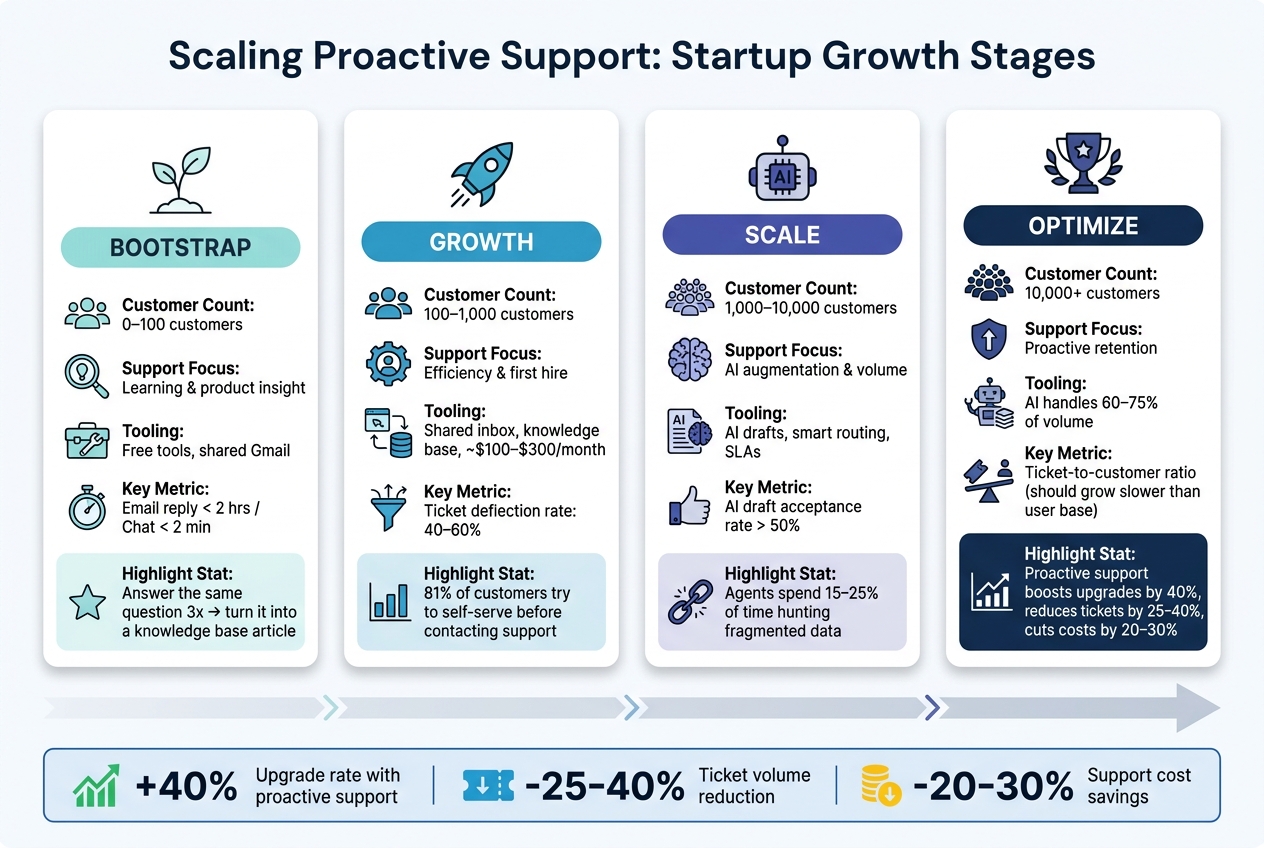
Your startup’s growth stage determines the best support strategies. What works for a small group of 50 customers won’t hold up when you’re managing 5,000. Here’s a quick overview of how support priorities shift as you grow:
| Growth Stage | Customer Count | Support Focus | Tooling Strategy |
|---|---|---|---|
| Bootstrap | 0–100 | Learning & product insight | Free tools, shared Gmail |
| Growth | 100–1,000 | Efficiency & first hire | Shared inbox, knowledge base, ~$100–$300/month |
| Scale | 1,000–10,000 | AI augmentation & volume | AI drafts, smart routing, SLAs |
| Optimize | 10,000+ | Proactive retention | AI handles 60–75% of volume |
Each stage demands a tailored approach to ensure smooth operations and effective tracking of key metrics.
In the Bootstrap stage, the focus isn’t on efficiency but on learning. Founders should get directly involved in support to uncover friction points in the product. As Jonathan Bar, Founder of Corebee, explains: (who recently shared his journey on startup tech leader episodes) "Support is product-market fit. It’s the signal that tells you whether your product actually works for real people." A practical tip? If you find yourself answering the same question three times, turn it into a knowledge base article immediately.
By the Growth stage, basic tools like a shared inbox and automation features – such as auto-tagging and canned responses – become essential. Moving into the Scale stage, the emphasis shifts to leveraging AI for efficiency. AI can draft responses and gather context for human agents to review, which ensures accuracy even if your documentation isn’t fully up to date yet.
Metrics That Guide Proactive Support
As your startup evolves, tracking the right metrics becomes crucial for refining your support strategy. But here’s the catch: the metrics that matter most will change depending on your growth stage. Focusing on the wrong ones can lead to wasted effort.
During the Bootstrap stage, prioritize responsiveness. Aim for email replies within 2 hours and chat responses within 2 minutes to show early customers you’re attentive. In the Growth stage, focus on ticket deflection rates. Strong self-service resources can deflect 40–60% of incoming tickets, especially since 81% of customers typically try to solve issues on their own before reaching out.
At the Scale stage, monitor your AI draft acceptance rate. If agents are approving more than 50% of AI-generated responses without edits, it’s a sign your knowledge base is ready for greater automation. In the Optimize stage, shift your attention to the ticket-to-customer ratio. Ideally, ticket volume should grow at a slower rate than your user base. As Wilson Wilson, author of the Ferndesk guide, puts it: "Most support teams scale linearly when they should scale logarithmically. If doubling your customer base means doubling your support team, you’re building a cost center that will eventually consume your margins."
sbb-itb-772afe6
How to Scale Proactive Support Systems
Bringing Customer Data Together Across Tools
The biggest challenge to scaling proactive support isn’t about hiring more staff – it’s about fragmented data, a common challenge discussed by startup tech leaders. When your CRM, billing software, support platform, and product analytics tools operate in isolation, your team is left without a unified view of the customer. In fact, support agents spend 15–25% of their time during each interaction just hunting down information that already exists somewhere in your systems.
"AI is only as good as the data it can access, and siloed data means siloed intelligence." – Andrey Avtomonov, CTO, Kaelio
Fortunately, you don’t need a full-scale data warehouse migration to solve this. A more practical solution for startups is creating a context layer – a lightweight integration that connects your existing tools in real time. For example, linking Stripe billing data, Zendesk tickets, and HubSpot CRM activity can provide your team with a single view of account health. Start small: focus on one high-value use case, like churn prediction, by combining billing, support, and usage data into one view. Once you’ve nailed that, you can gradually expand the integration.
With a unified data system that delivers real-time insights, the next step is figuring out the right balance between automation and human interaction.
Balancing Automation With Human Interaction
When your tools are integrated, the next decision is clear: what should be automated, and what needs a human touch? Automation is great for handling high volumes, but humans are essential for addressing complexity. A simple way to approach this is by tiering your support based on account value. Here’s an example framework:
| Support Tier | Customer Profile | Access Channel | Automation Level |
|---|---|---|---|
| Enterprise | High ARR ($50k+) | Dedicated rep, Slack, phone | Low (human-led) |
| Growth | Mid ARR ($5k–$50k) | Priority chat, email | Balanced (AI + human) |
| Self-Serve | Low ARR (under $5k) | Email, knowledge base | High (AI-led) |
| Free/Trial | Non-paying | Knowledge base, community | Full automation |
This tiered approach ensures every customer gets the right level of attention. For example, high-value enterprise accounts might have access to dedicated human reps and Slack channels, while smaller accounts rely more on AI-led self-service.
To make this work, seamless transitions between AI and human agents are crucial. When AI escalates an issue, the human agent should receive the full conversation history, details about the problem, and relevant account data. Intercom’s support team implemented this model with their AI agent, Fin, and saw impressive results. Between late 2022 and May 2026, Fin resolved 81% of support inquiries, allowing the company to handle a 300% surge in customer demand without increasing staff, saving an estimated $7.5M–$9M annually.
While automation can be a game-changer, overdoing it can create new challenges for both customers and your team.
Avoiding Over-Automation and Notification Fatigue
Automation is only helpful if it’s actionable. Bombarding your team with low-priority alerts can lead to important signals being missed. To prevent this, use suppression logic to ensure alerts only trigger when multiple risk factors align – like a high-value account with open tickets and a declining sentiment score.
The same principle applies to customer-facing messages. A global busy state can help prevent overwhelming customers. For instance, if a customer is already engaged in a support interaction, this feature can pause unrelated automated messages, such as marketing emails or onboarding reminders. This avoids sending mixed or poorly timed signals that can damage trust.
Ultimately, proactive support only works when your notifications and outreach are both timely and relevant.
Building and Training a Proactive Support Team
Defining Roles and Ownership
Proactive support simply doesn’t work without clearly defined roles. To avoid confusion, use a RACI-style framework to assign ownership for each signal type. Here’s an example of how responsibilities might be mapped out:
| Signal Type | Owner | Action |
|---|---|---|
| Knowledge gap / recurring question | Product/Content Marketing | Update documentation, close ticket patterns |
| Escalation risk / high-severity ticket | Support Lead/Manager | Intervene before the issue escalates |
| Churn signal / declining account health | Customer Success Manager | Reach out to mitigate retention risks |
| Root cause / product bug pattern | Engineering/SMEs | Investigate and resolve upstream issues |
In the early days of a startup, founders often handle Tier 3 escalations – those high-risk, complex situations where deep context is essential. As the team grows, a Support Operations Lead can take over scaling responsibilities. This includes evaluating tools, refining processes, and ensuring the system is functioning as intended. Assigning ownership at every level reduces churn risks by ensuring critical signals don’t get overlooked – especially as customer data becomes more fragmented and ticket volumes increase.
Once roles are clearly assigned, the next step is preparing your team to identify and address issues before they snowball.
Training Teams to Spot and Address Issues Early
The core skills for proactive support are data literacy, pattern recognition, and customer empathy. These skills enable agents to catch potential problems before they escalate. A key part of this training is teaching agents to recognize two types of escalations: those caused by missing context and those requiring senior-level decision-making. Understanding this distinction helps agents route issues more efficiently, saving time for both the team and the customer.
One effective method is running a 30-day "shadow mode" trial before introducing automation. During this phase, AI generates draft responses, but human agents review and approve them before sending. This approach builds trust in the AI system, highlights gaps in existing documentation, and prevents the AI from giving incorrect answers due to outdated information. Teams can also track the AI draft acceptance rate to identify areas where the knowledge base needs improvement.
Additionally, set aside two uninterrupted hours each week for agents to analyze ticket trends. This dedicated time is invaluable for spotting patterns and addressing them proactively, ultimately reducing ticket volume and improving customer experiences.
Building Playbooks for Scalable Support
Once your team is well-trained, the next step is creating detailed playbooks to streamline proactive support. A playbook serves as a decision-making guide. Each entry should include four key elements: the trigger (what initiates the process), the message template (what to communicate), the shared resources (links or guides to include), and the response logic (how to proceed based on the customer’s reply).
Start by reviewing 200–500 recent tickets and sorting them into three categories: simple how-to questions, multi-step issues needing context, and complex or high-risk cases requiring human judgment. This exercise often reveals that 40%–60% of tickets could be resolved with better documentation. Addressing these gaps reduces ticket volume even before automation is introduced, tackling the challenges of fragmented data and high support demand.
As your playbook evolves, make sure to track the outcomes of every alert. For instance, if proactive outreach prevents an escalation, document it. This helps refine alert thresholds and provides concrete evidence to demonstrate that proactive support isn’t just a cost – it’s a driver of growth.
Measuring and Improving Proactive Support Over Time
Tracking the Right Outcome Metrics
Once you’ve set up scalable support processes, the next step is figuring out how well they’re working. It’s all about tracking the right metrics in three key areas: operations, customer sentiment, and business impact. For operations, focus on metrics like Ticket Deflection Rate, First Contact Resolution (FCR), and the Proactive-to-Reactive Ratio. These help you understand how efficiently your support system is functioning.
When it comes to customer sentiment, zero in on CSAT (Customer Satisfaction) and NPS (Net Promoter Score) specifically tied to proactive interactions. These scores reveal whether customers appreciate your outreach or find it unnecessary. For business impact, compare retention, upsell, and renewal rates between customers who’ve experienced proactive outreach and those who haven’t.
Here’s why these metrics matter: improving FCR alone can cut churn by up to 67%, and boosting customer retention by just 5% can increase profits by as much as 95%. These aren’t just small wins – they’re game-changers that make proactive support worth every penny. Plus, these numbers don’t just measure success; they also highlight where you can fine-tune your approach for even better results.
Using Feedback Loops to Refine Your Approach
Metrics are only useful if you act on them. That’s where feedback loops come in. Use a cycle of train, test, deploy, and analyze to keep improving. After every proactive campaign or alert, take a close look at the results. Did it lower ticket volume? Did it stop potential escalations? Were customers more responsive?
You can also use AI to monitor subtle shifts in customer sentiment. Even when a customer’s tone seems polite, underlying negativity might be brewing. Catching these early signals can help you intervene before they consider leaving. Another effective strategy is setting up “two-strikes” alerts – automated flags for accounts dealing with multiple complex issues in a short time. These alerts can trigger immediate human follow-ups.
"When teams optimize for deflection instead of retention, they don’t see the bigger picture: that customers with positive support experiences are 40% more likely to upgrade." – Kenji Hayward, Senior Director of Customer Support, Front
Don’t forget to loop in your product team. If proactive outreach highlights recurring bugs or missing features, feed that data into your product roadmap. Then, let customers know when you’ve fixed the issue. This shows them you’re listening and acting, which builds trust and encourages renewals. By constantly refining your approach, you can learn from every interaction and become more effective over time.
Learning From Startup Stories and Tech Leaders
Sometimes, the best lessons come from those who’ve been in the trenches. Founders and tech leaders often share their experiences with scaling support systems, balancing automation with human touch, and recovering from setbacks. Podcasts like Code Story dive into these real-world stories, offering practical advice on what works – and what doesn’t. These insights go beyond frameworks, giving you actionable strategies to navigate challenges and avoid common mistakes.
Why Most ‘Proactive’ Customer Support Isn’t Actually Proactive?
Conclusion: Key Takeaways for Scaling Proactive Support
Scaling proactive support requires a mindset shift in customer success. The principle is straightforward: fixing problems before customers even notice them reduces the connection between growth and ticket volume. While reactive support grows in proportion to your customer base, proactive support has a compounding effect, decreasing future ticket volume as you improve at preventing issues in the first place.
Your approach should evolve alongside your company. What works for 50 customers, like founder-led outreach, won’t scale for 5,000. The progression is gradual: start with manual, personalized efforts, integrate AI tools as your team expands, and eventually rely on AI-driven systems capable of handling 60–75% of ticket volume. The sequence matters – build your knowledge base first, automate basic (Tier 1) tickets, and ensure human oversight for complex or sensitive cases.
Automation is a tool to enhance, not replace, human judgment. Proactive support thrives on balancing AI efficiency with human insight. Josh Solomon, General Manager and VP of Revenue at Mosaic AI, highlights that success is measured by how well support drives positive customer outcomes.
This shift also demands new metrics for success. Moving from focusing on tickets closed to emphasizing outcomes achieved is what separates scalable teams from those that struggle. Focus on metrics like retention rates, customer satisfaction (CSAT) from proactive interactions, and the ratio of proactive to reactive support. These numbers help refine your strategies and prove ROI.
Finally, proactive support isn’t static. Customer expectations change, your product evolves, and today’s friction points won’t be tomorrow’s. Regularly revisit your strategy – test new approaches with small customer segments, update your documentation, and ensure your knowledge base stays accurate. Proactive support only works when the information behind it is reliable and current.
FAQs
When should a startup start proactive support?
Startups should introduce proactive support early on – preferably as soon as they can foresee potential customer challenges. The process often begins with analyzing support data to spot recurring questions or common pain points. Once these patterns are clear, businesses can implement solutions like automated responses, self-service tools, or onboarding guides. These measures not only preempt issues but also help minimize support requests and establish trust as the company scales.
What should we automate first with AI in support?
Start by automating repetitive, high-volume inquiries to lighten your team’s workload and speed up response times. AI can take care of common questions, intelligently route tickets, and even help draft replies. This can lead to auto-resolution rates of 60-75%. To make AI truly effective, ensure your knowledge base includes at least 30 articles and that your team manages over 200 conversations per month. Additionally, automating workflows like ticket routing and setting up proactive alerts can help your startup scale more efficiently as it grows.
Which metrics prove proactive support ROI?
When it comes to measuring the return on investment (ROI) of proactive support, several key metrics stand out. These include:
- Customer retention rates: A higher retention rate reflects satisfied customers who see value in your service.
- Customer satisfaction (CSAT): A direct measure of how happy customers are with your proactive approach.
- Net Promoter Scores (NPS): Indicates how likely customers are to recommend your business, often influenced by proactive support.
- Reduced ticket volumes: Fewer support tickets mean customers are encountering fewer issues – or resolving them independently.
- Increased ticket deflection rates: Shows how often customers find solutions without needing to contact support.
- Proactive intervention rates: Tracks how often your team successfully addresses issues before they escalate.
- First contact resolution (FCR): Measures how often issues are resolved in a single interaction, improving efficiency and satisfaction.
- Cost savings from fewer escalations: Lower escalation rates mean reduced operational costs and a smoother support process.
Together, these metrics paint a clear picture of how proactive support enhances the customer experience while keeping operational expenses in check.