Infrastructure as Code (IaC) simplifies cloud infrastructure management but introduces risks if not secured properly. Misconfigurations in IaC can lead to vulnerabilities, breaches, and costly incidents. Here’s what you need to know:
- Common Risks: Over-permissive access, public resources, missing encryption, hard-coded secrets, and unsecured state files.
- Key Strategies:
- Use version control with pull requests and branch protections.
- Create reusable, secure modules with pre-configured best practices.
- Secure secrets using tools like AWS Secrets Manager or HashiCorp Vault.
- Automate security checks in CI/CD pipelines with tools like Checkov and tfsec.
- Continuously monitor for drift and runtime changes.
Why It Matters: 67% of cloud breaches stem from misconfigurations, and addressing issues during code review is 10x cheaper than fixing them post-deployment. By embedding security into your workflow, you can prevent incidents, reduce costs, and maintain compliance.
Read on to learn how to secure your IaC from development to deployment.
Building a Secure IaC Foundation
Version Control and Branching Strategies
When it comes to securing Infrastructure as Code (IaC), Git is your starting point. Every infrastructure change should pass through pull requests. This step acts as a crucial checkpoint, allowing peers and automated tools to catch potential issues before they reach production.
Branch protection is non-negotiable. Disable direct pushes to protected branches and require at least one approval from a designated CODEOWNER before merging. Combine this with required CI status checks, such as linting and security scans, to ensure a failing scan automatically blocks the merge.
"A compromised pipeline gives an attacker a direct path from a poisoned pull request to your production environment." – SystemsArchitect Team
To mitigate supply chain risks, avoid mutable version tags. Instead, pin dependencies to full commit SHAs (e.g., uses: actions/checkout@b4ffde65...).
Another essential practice is setting up pre-commit hooks using tools like checkov, tfsec, and detect-private-key. These tools catch misconfigurations and exposed credentials before the code is even pushed. Addressing issues at this stage is far less expensive than fixing them after deployment.
Once your version control is secure, the next step is to focus on modular architecture, ensuring security is baked into every deployment.
Modular Architecture for Security
With version control practices in place, modular design becomes the next cornerstone of a secure IaC framework. Instead of duplicating resource definitions across environments, create reusable modules that are pre-configured with security best practices – such as encryption, tagging, and least-privilege access. This approach ensures that every team using the module benefits from these secure defaults automatically.
A good module encapsulates a complete, well-thought-out pattern. For instance, an S3 module might enforce server-side encryption, block public access, and enable versioning by default. A module that merely renames a resource offers little value. The benefit? Updates to modules propagate consistently across all environments.
"Infrastructure as Code is a discipline, not just a tool. Treat your infrastructure repository with the same care and rigor as your application code." – Nawaz Dhandala, Author
Organize your repository with a clean directory structure that separates reusable modules/ from environments/. Each module should follow a consistent file layout:
| File | Purpose |
|---|---|
main.tf | Defines resources or nested module calls |
variables.tf | Declares inputs with types and descriptions |
outputs.tf | Enables module composability |
versions.tf | Pins Terraform and provider versions |
locals.tf | Simplifies main logic |
Two additional tips to avoid future headaches: use for_each instead of count when iterating resources (to prevent unintended cascading deletions), and always enable deletion protection for stateful resources like databases within the module definition.
Secrets Management in IaC
Protecting sensitive data is another critical layer of IaC security. Long-lived credentials should be eliminated wherever possible. Instead, use IAM roles for EC2 instances and Lambda functions. For database passwords or API tokens, store them securely in tools like AWS Secrets Manager or HashiCorp Vault, and retrieve them dynamically during runtime. Enable automated credential rotation to minimize the impact of any exposure.
Pay special attention to Terraform state files. As Nawaz Dhandala of OneUptime warns:
"If someone gains access to your state file, they effectively have a map of your entire infrastructure along with the keys to access it."
Never store state files locally. Instead, use a remote backend – such as an S3 bucket configured with versioning, SSE-KMS encryption, and a strict bucket policy that denies unencrypted uploads. If you’re using Terraform v1.10 or later, take advantage of the ephemeral = true setting on sensitive variables. Unlike the sensitive argument, which only hides values in CLI output, ephemeral ensures the value is not written to the state file at all.
sbb-itb-772afe6
Infrastructure as Code Security Best Practices & Strats | Joshua Arvin Lat | Conf42 DevSecOps 2023
Automating IaC Security in CI/CD Pipelines
IaC Security Pipeline: From Code to Cloud
Once your Infrastructure as Code (IaC) foundations are secure, the next step is embedding security into your CI/CD pipeline. This ensures vulnerabilities are caught and addressed early in the development process.
Shift-Left Security in Development
After securing secrets and hardening modules, the focus shifts to identifying issues as early as possible. The philosophy of shift-left security is straightforward: the sooner you detect a misconfiguration, the less it costs to fix. This approach can significantly reduce remediation expenses.
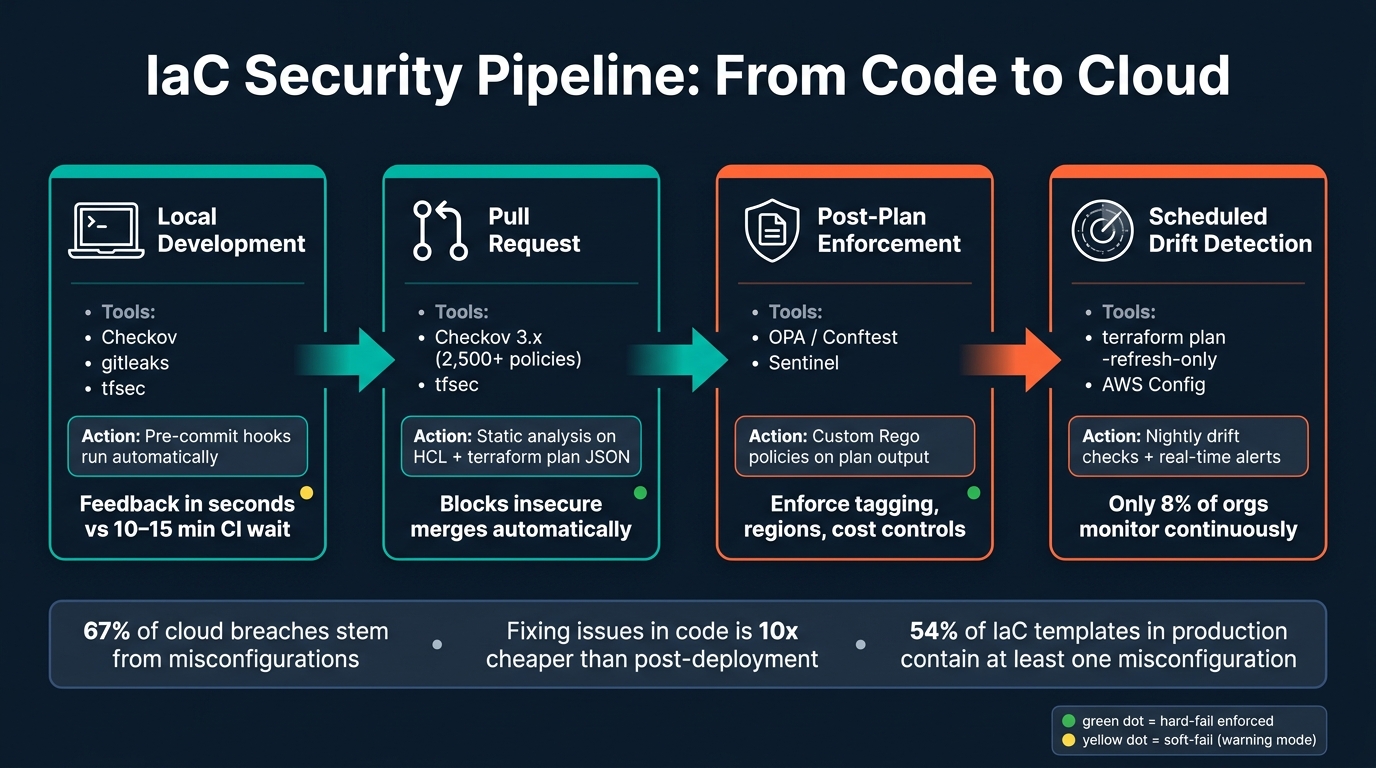
The starting point for this strategy is the developer’s machine. By setting up a .pre-commit-config.yaml file, tools like Checkov, tfsec, and gitleaks can run automatically before any code is pushed. These tools provide immediate feedback, often within seconds, eliminating the need to wait 10–15 minutes for a CI job to complete. This rapid feedback loop encourages developers to prioritize security right from the beginning.
Beyond these pre-commit checks, automated static analysis becomes the next layer of defense in your pipeline.
Static Analysis and Policy Automation
When code reaches the pull request stage, the CI pipeline takes over as the enforcer of security standards. Checkov 3.x (the latest version as of 2026) offers over 2,500 built-in policies for platforms like AWS, Azure, GCP, and Kubernetes. It goes beyond basic attribute checks by parsing IaC into a graph to analyze resource relationships. For example, it can detect if an S3 bucket has an incorrect CloudFront origin policy.
"Infrastructure as Code security is the practice of analyzing infrastructure definitions for security risks before they are applied. It is the shift-left principle applied to cloud infrastructure." – Releaserun
Scanning the JSON output of a terraform plan provides a complete picture of resolved variables and module outputs. While static HCL scanning might miss vulnerabilities tied to resolved variables, analyzing the plan JSON ensures nothing slips through. For custom rules – such as enforcing specific resource tags, approved AWS regions, or cost controls – Open Policy Agent (OPA) with Conftest allows you to write tailored policies in Rego and apply them to the plan JSON.
One healthcare startup used this method in their GitHub Actions pipeline while working toward HIPAA compliance. An initial scan revealed 47 violations related to encryption, network security, and logging. After three weeks of remediation, their automated pipeline caught an additional 31 violations before they could impact production.
These static checks lay the groundwork for securing the entire CI/CD pipeline.
Secure CI/CD Pipeline Best Practices
A well-structured CI/CD pipeline enforces security at every stage, complementing early development efforts:
| CI/CD Stage | Tool/Action | Purpose |
|---|---|---|
| Local Development | Pre-commit hooks (Checkov, gitleaks) | Catch basic errors before code is pushed |
| Pull Request | Checkov / tfsec | Prevent insecure merges with thorough scans |
| Post-Plan | OPA / Sentinel | Enforce business and cost rules on plan output |
| Scheduled | Drift Detection (terraform plan) | Detect manual changes outside of IaC |
For critical policies – like public S3 buckets or open SSH ports – set your pipeline to soft_fail: false to enforce hard failures. For less critical or newer policies, start with soft-fail mode (warnings only) to allow teams time to address existing issues. Once resolved, transition to hard-fail mode. This step-by-step approach prevents disruptions to deployments.
"Your CI/CD pipeline is the most privileged system in your organization. It has credentials to deploy code to production, modify infrastructure, and access secrets." – SystemsArchitect Team
Replace long-lived CI credentials with OIDC federation, which issues short-lived, scoped tokens to pipeline runners. To handle false positives, use inline suppression comments (e.g., #checkov:skip=CKV_AWS_20:Reason) to document exceptions directly in the code. This keeps justifications version-controlled and avoids burying them in unrelated tickets.
Lastly, configure scanners to output results in SARIF format. This ensures findings appear in tools like the GitHub Advanced Security dashboard or GitLab Security tab – places where developers are already working.
Monitoring and Managing IaC in Cloud
Setting up a secure CI/CD pipeline is just the beginning. Once your infrastructure is deployed, things can quickly get unpredictable. Engineers might make emergency fixes directly in the console, cloud providers could roll out auto-updates, and security tools sometimes modify resources outside your IaC workflow. Without continuous monitoring, these changes might go unnoticed until they cause a problem. Let’s dive into how you can detect and address configuration drift in real time.
Detecting and Fixing Configuration Drift
Configuration drift happens when your live infrastructure no longer matches the definitions in your IaC code. This often occurs due to manual changes or quick fixes. As Arunav Sarkar from Stackgen explains:
"Drift between what’s in code and what’s actually deployed is a compliance time bomb."
Drift creates inconsistencies between your IaC code, Terraform state, and the live environment. To identify drift, you can run terraform plan -refresh-only, which highlights mismatches without automatically updating the state. Explicit approval is then required to proceed. For ongoing checks, you can integrate nightly drift detection into your CI pipeline using the -detailed-exitcode flag. An exit code of 2 signals drift, which can then trigger automated alerts.
AWS Config is another powerful tool for monitoring. It continuously checks your resources and flags them as "noncompliant" if they deviate from predefined rules. It operates in two modes: detective (monitoring changes after deployment) and proactive (evaluating configurations before deployment). While drift detection helps maintain alignment, runtime monitoring offers instant alerts for unexpected changes. For manually created resources that need to be brought under IaC management, Terraform 1.5+ introduces import blocks, allowing you to manage these resources declaratively and create an auditable pull request trail.
Ultimately, the best long-term solution is adopting a strict GitOps workflow. By limiting console and CLI write access, you can ensure all changes are routed through your IaC pipeline.
Runtime Monitoring and Alerting
Nightly drift checks are helpful, but real-time monitoring is even better. Surprisingly, only 8% of organizations monitor continuously, leaving a significant blind spot where many incidents originate.
"If your governance only runs when code ships, you’re blind to most of the changes that actually cause incidents." – Joe Karlsson, Developer Advocate, CloudQuery
A robust runtime monitoring strategy has three layers: deploy-time checks that block non-compliant changes in CI/CD, periodic runtime evaluations (every 1–6 hours) against your infrastructure state, and historical snapshots for audits and incident investigations. Changes can be categorized for better response management: security issues like an open SSH port might trigger an immediate PagerDuty alert, functional changes could send a Slack notification, and minor cosmetic differences might just be logged.
For critical violations, automate remediation. For example, you can block public access to an S3 bucket as soon as it’s exposed, revoke overly permissive security group rules, or delete newly created root access keys. AWS EventBridge paired with Lambda can execute these fixes in seconds. To ensure your state files remain intact, use remote state with locking – such as S3 combined with DynamoDB – to prevent issues from concurrent operations.
Threat Detection and Incident Response
While runtime monitoring tells you what has changed, threat detection helps you understand why it matters. Building on your CI/CD safeguards, drift detection, and runtime alerts, threat detection completes a comprehensive security approach. Tools like tf-analyze go beyond basic policy checks by creating an attack graph using Breadth-First Search. This method prioritizes risks based on how exploitable they are, not just their severity. The tool includes 353 rules covering AWS, GCP, and Azure, with nearly 200 focused on security.
When an incident occurs, blast-radius analysis helps you quickly assess the impact of a breach caused by a compromised resource or an unintended terraform apply. Pairing this with threat intelligence, such as the CISA Known Exploited Vulnerabilities (KEV) catalog, ensures your team focuses on actively exploited vulnerabilities. For legacy systems, baseline ratcheting provides a practical solution. By snapshotting existing issues, you can prevent CI from failing on old problems and instead focus on new ones.
"Security should not depend on people remembering rules. Security should be enforced by systems." – Ayush Yadav
IaC Security Governance and Team Enablement
Effective threat detection and runtime monitoring can only take you so far if your team lacks the governance structures to act on findings. This section dives into aligning Infrastructure-as-Code (IaC) practices with compliance requirements, organizing cloud accounts for security, and empowering your team to build and maintain secure infrastructure.
Compliance Frameworks for IaC
Many U.S. teams leverage IaC to meet compliance requirements automatically. The key is to map your IaC policies directly to specific compliance controls, allowing a passing CI/CD pipeline to double as audit evidence.
| Framework | Primary Scope | Key IaC Focus Areas |
|---|---|---|
| SOC 2 | Service organizations | Encryption, access control, tamper-proof logging |
| PCI DSS | Payment processing | Network segmentation, encryption, vulnerability scanning |
| HIPAA | Healthcare data (PHI) | Encryption, audit trails, data residency controls |
| FedRAMP / NIST 800-53 | U.S. government services | NIST control mapping, System Security Plans |
| CIS Benchmarks | Cloud provider configs | AWS/Azure/GCP best-practice baselines via Checkov/tfsec |
To implement Compliance-as-Code, write machine-readable policies using tools like OPA/Rego. These policies can act as gates within your CI/CD pipeline, replacing manual checklists with automated enforcement. For example, Stripe achieved PCI DSS Level 1 compliance by enforcing a 100% pass rate on pull request gates and automating evidence collection. This reduced their audit preparation from three weeks to just two days, with no compliance violations in production over two years.
"Compliance used to be a seasonal activity… Cloud-native delivery, high-velocity DevOps, and increasingly prescriptive standards have rendered that cadence obsolete." – Craig Petronella, CEO, Petronella Technology Group
Automating compliance testing for IaC can cut audit prep time by 73% and eliminate 91% of compliance-related deployment failures. Store signed plan outputs and scan reports as immutable audit artifacts, keeping them for the required retention period – 1 year for SOC 2 and 6 years for HIPAA.
Once compliance is in place, structuring your cloud environments effectively further strengthens your security posture.
Multi-Environment and Account Structures
Organizing your cloud environments into separate accounts is one of the best ways to limit the impact of incidents and enforce consistent security policies. A common approach is to use Organizational Units (OUs) to group accounts by function. For example:
- Security OU: Dedicated to log archiving and auditing
- Infrastructure OU: Manages shared networking
- Workloads OU: Contains isolated Dev, Staging, and Production accounts
- Sandbox OU: Used for experimentation with strict budget limits
- DevTools OU: Manages CI/CD pipelines and cross-account IAM roles
To enforce security across these accounts, use preventive guardrails like Service Control Policies (SCPs). These policies can block root user actions, restrict regions, or mandate encryption, ensuring misconfigurations never reach production. BPX Energy, for example, used AWS Control Tower to implement such a structure. CTO Grant Matthews highlighted:
"The key benefits of adopting AWS Control Tower included enhancing BPX Energy’s security posture, enabling enterprise governance at scale, and providing increased scalability."
Centralize all logging (e.g., CloudTrail, VPC Flow Logs) in a Log Archive account, using S3 Object Lock to prevent tampering. Additionally, enforce a mandatory tagging schema (e.g., Environment, CostCenter, Owner) through SCPs to ensure every resource is traceable for both billing and audits.
Once your accounts are secure, enabling your team through training and clear ownership is the next step.
Training and Knowledge Sharing
Even with secure CI/CD and IaC practices, continuous team enablement is critical to maintaining effective controls. Start small by focusing on the 10–20 most critical rules, such as preventing public storage buckets or open security groups. This approach helps developers build familiarity without feeling overwhelmed.
Use golden modules – pre-approved, version-controlled IaC modules with secure defaults – to make compliance easier and more natural. Pair this with graduated enforcement that provides clear, actionable error messages, so developers understand exactly what went wrong and how to fix it.
Podcasts like Code Story offer practical insights into building a strong security culture. You can also use CODEOWNERS files to require security or platform engineer reviews for infrastructure changes, embedding knowledge sharing directly into the pull request process. This is especially important given that 54% of IaC templates in production contain at least one misconfiguration.
Key Takeaways for Securing IaC in Cloud
Securing Infrastructure as Code (IaC) in the cloud requires a consistent focus on automation, monitoring, and governance. Each layer plays a critical role: automation helps catch misconfigurations before deployment, monitoring detects issues like configuration drift or runtime anomalies, and governance ensures every change is policy-driven and fully auditable. These practices are essential because the stakes in cloud security are incredibly high.
Did you know that 81% of cloud breaches are caused by misconfigurations? Even more alarming, fixing a vulnerability in production can cost 100 times more than addressing it during development. This is why "shift-left scanning" has become such a crucial strategy. As Sebastian Stadil, CEO of Scalr, explains:
"Shift-left scanning is non-negotiable. Run Checkov, Snyk, or other vulnerability scanners on every PR – 63% of cloud incidents come from misconfiguration, and most of those are catchable in code."
By catching vulnerabilities early, teams can save both time and resources. The most effective teams treat IaC security as a workflow challenge rather than a simple scanning task. For example, Cloudflare integrates 50 automated security policies into its CI/CD pipelines, ensuring that production environments remain secure.
Beyond reducing incidents, robust IaC security simplifies audits and provides developers with clear guidelines. Christophe Limpalair, Founder of Cybr, highlights this perfectly:
"IaC security is not about slowing down development. With the right practices and tools, teams can ship faster, safer, and with greater confidence."
FAQs
Which IaC checks should block a merge vs just warn?
To handle Infrastructure as Code (IaC) security efficiently, begin by setting all checks to advisory mode. This approach minimizes unnecessary alerts and helps build trust in the process. Once you’ve fine-tuned these checks, you can escalate critical ones to hard-gates that prevent merges.
Use these hard-gates to block merges for serious issues such as exposed secrets, public storage buckets, overly permissive IAM roles, or unencrypted data. For less critical or experimental checks, keep them as warnings. This ensures you maintain visibility into potential issues without interrupting workflows unnecessarily.
How do I keep secrets out of Terraform state files?
To protect sensitive data in Terraform state files, you can take several precautions. Use ephemeral values to handle secrets like tokens or passwords. These values are only used during runtime and are excluded from state files. Similarly, leverage write-only arguments to pass secrets without saving them in the state.
On top of that, make sure to encrypt state files using customer-managed keys. This adds an extra layer of security. Also, enforce least-privilege IAM access to restrict who can access the state files. Lastly, avoid storing state files in version control systems to prevent unintended exposure.
What’s the simplest way to detect and fix drift fast?
The easiest approach is to build automated checks right into your CI/CD pipeline. If you’re using Terraform, you can schedule a terraform plan -refresh-only command. This helps spot any differences between your infrastructure and the state file without making changes. If you notice unexpected changes, you have two options: run terraform apply -refresh-only to update your state file or undo any manual changes to align with your code. For more advanced workflows, you can implement event-driven detection or leverage specialized tools to get real-time alerts and even automate fixes.