Tech leaders often struggle to balance technical, managerial, and strategic responsibilities. The biggest challenge? Spending too much time on low-priority tasks like Slack notifications and production issues instead of focusing on team growth, architecture planning, or long-term goals. Here’s how they take back control:
- Organize responsibilities into "leadership buckets" (e.g., strategy, progress monitoring, feedback) and allocate time accordingly.
- Audit your time: Track your weekly activities to identify gaps between actual and ideal time use.
- Use time blocking: Dedicate 90–120 minutes for deep work and batch similar tasks to reduce context switching.
- Delegate wisely: Hand off tasks others can do and focus on areas requiring your expertise.
- Simplify communication: Set clear response expectations for Slack, email, and meetings.
- Refine your calendar: Use a "shadow calendar" to align your schedule with priorities and minimize distractions.
Time Management for Engineering Managers at Silicon Valley Code Camp 2019
sbb-itb-772afe6
Clarify Role Priorities and Time Allocation
Tech Leader Time Management: Ideal vs. Actual Time Allocation
As a tech leader, your responsibilities likely span strategic, technical, and managerial areas. Many startup tech leaders face these same challenges when scaling their roles. Without clear definitions, it’s easy to get pulled into the most immediate or noisy tasks. Setting priorities and allocating time effectively can help you focus on what truly matters.
Define Your Leadership Buckets
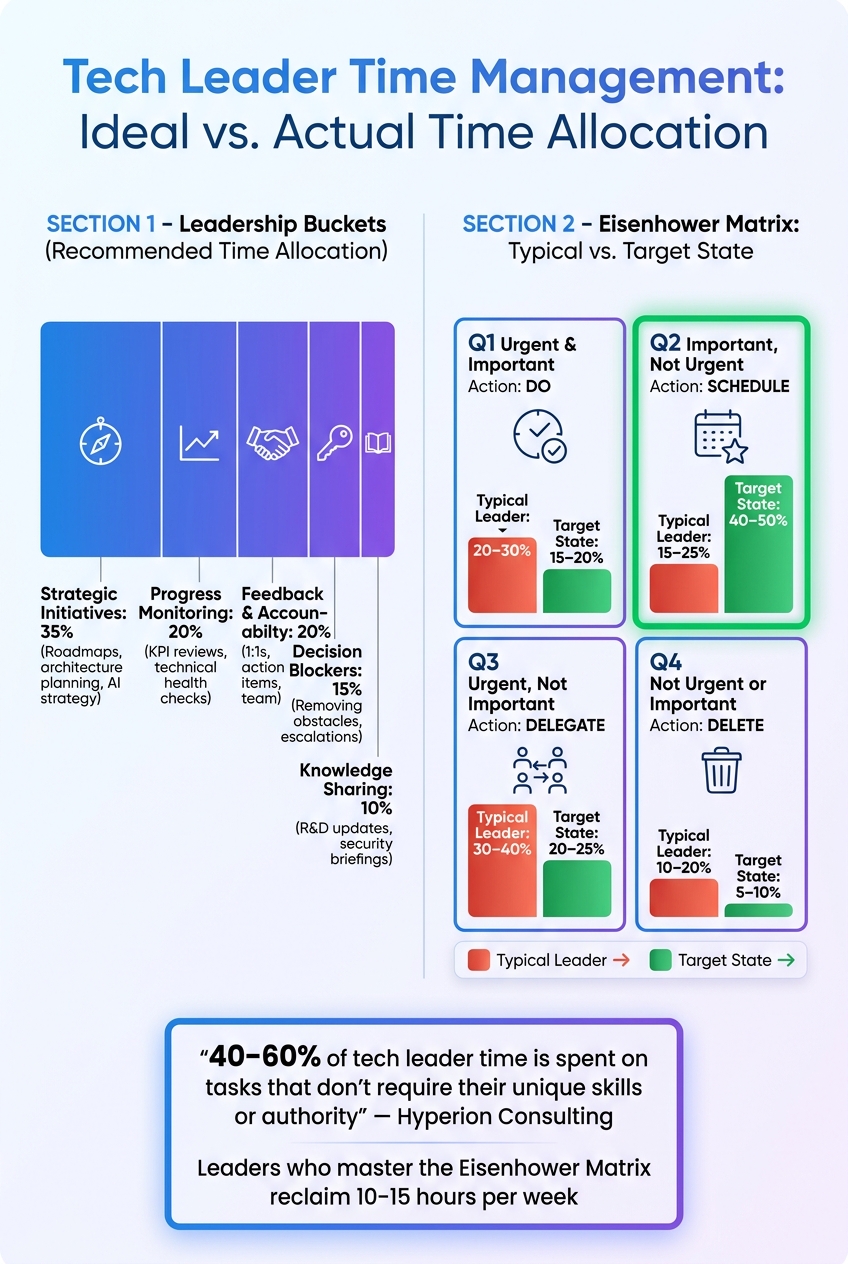
Start by organizing your responsibilities into 3–5 key "leadership buckets." Here’s a breakdown to guide you:
| Leadership Bucket | Recommended Time | Key Activities |
|---|---|---|
| Strategic Initiatives | 35% | Roadmaps, architecture planning, AI strategy |
| Progress Monitoring | 20% | KPI reviews, technical health checks |
| Decision Blockers | 15% | Removing obstacles, escalations |
| Knowledge Sharing | 10% | R&D updates, security briefings |
| Feedback & Accountability | 20% | 1:1s, action items, team development |
Source: MoldStud Research Team
For tech leads overseeing 4–8 engineers, dedicating 30–50% of your time to coding is considered reasonable. As Josh Hornby, Tech Lead, advises:
"You should write enough code to stay credible… You shouldn’t write so much code that you become a bottleneck."
Audit How You Currently Spend Time
Once your leadership buckets are defined, evaluate how your current schedule aligns with these priorities. Track your activities in 30-minute increments over a week. Export your calendar into a spreadsheet, using days as rows and buckets as columns, to calculate the percentage of time spent on each area.
A helpful tool is the "shadow calendar" – a template for your ideal schedule. Chris Evans, CPO of Incident.io, uses this method to recalibrate his calendar whenever it becomes too scattered. If your actual week deviates significantly from the template, use it as a guide to make adjustments and refocus on strategic goals.
Compare Ideal vs. Actual Time Use
Audits often reveal a disconnect between how leaders spend their time and their actual priorities. Research from Hyperion Consulting shows that tech leaders spend 40–60% of their time on tasks that don’t require their unique skills or authority. Here’s a framework to help realign your time:
| Quadrant | Typical Leader | Target State | Action |
|---|---|---|---|
| Q1: Urgent & Important | 20–30% | 15–20% | Do |
| Q2: Important, Not Urgent | 15–25% | 40–50% | Schedule |
| Q3: Urgent, Not Important | 30–40% | 20–25% | Delegate |
| Q4: Not Urgent, Not Important | 10–20% | 5–10% | Delete |
Source: Hyperion Consulting
The main shift is reallocating time from Q3 (reactive, delegable tasks) into Q2 (strategic work). This includes activities like hiring, making architecture decisions, and fostering team growth. Molly Graham, Founder of Glue Club, emphasizes this point:
"Time is emphasis, and your calendar very directly affects what gets done in the company and how you spend the dollars of the people who work for you."
Recognizing this gap is the first step toward building a system that prioritizes what’s most impactful.
Implement Time Blocking and Prioritization
Now that you’ve completed your time audit, it’s time to create a schedule that prioritizes your most important work. By using time blocking and prioritization frameworks, you can focus on tasks that truly matter instead of constantly reacting to whatever pops up next.
Core Time Blocking Practices
Time blocking is all about dedicating specific chunks of time to focused work. A related concept, time boxing, goes one step further by setting a firm deadline to complete a task, which can help curb perfectionism.
For tasks that require deep focus – like technical or strategic work – aim for blocks of 90 to 120 minutes. Shorter blocks tend to disrupt concentration, especially on complex projects. As Cal Newport, author of Deep Work, explains:
"A 40 hour time-blocked work week, I estimate, produces the same amount of output as a 60+ hour work week pursued without structure."
To make your week even more productive, try task batching (grouping similar tasks like emails, Slack replies, and approvals into one block) and day theming (dedicating entire days to specific types of work, like "Strategy Mondays" or "Deep Work Wednesdays"). Also, schedule 10–20 minute buffers between meetings to avoid context switching and give yourself time to reset. Jack Dorsey famously used day theming to stay focused while managing both Square and Twitter, assigning each day a specific theme.
Once you’ve established your time blocks, use prioritization frameworks to align tasks with your schedule.
Prioritize Tasks Using Proven Frameworks
With your schedule in place, the next step is deciding what tasks deserve your attention. The Eisenhower Matrix is a simple yet powerful tool for sorting tasks by urgency and importance. Here’s how it works:
| Quadrant | Type | Action | Examples for Tech Leaders |
|---|---|---|---|
| Q1 | Urgent & Important | DO | P0 outages, security breaches, board presentations |
| Q2 | Important, Not Urgent | SCHEDULE | Strategy, architecture reviews, hiring pipeline |
| Q3 | Urgent, Not Important | DELEGATE | Routine status meetings, non-critical Slack messages |
| Q4 | Not Urgent or Important | DELETE | Meetings without agendas, unnecessary Slack checking |
The goal is to allocate more time to Q2, where high-impact, strategic work resides. Leaders who consistently use this matrix often see a 22% improvement in project completion rates. Combine the matrix with the 80/20 rule – the idea that 20% of your tasks produce 80% of your results – to zero in on the most impactful Q2 activities.
"If everything is urgent, nothing is urgent. Urgency should be reserved for genuine crises – things where delay causes irreversible harm." – Mohammed Cherifi, Founder & CEO, Hyperion Consulting
Use Your Calendar as a Command Center
Your calendar should reflect your priorities, not just track meetings. Use color coding to make it easy to see if your schedule aligns with your goals – for example, blue for focused work, red for meetings, and purple for learning.
To protect your focus blocks, label them with neutral but firm names like "Collaboration Session" or "Research Review" on shared calendars. Khoi Vinh, Principal Designer at Adobe, uses this approach to safeguard his deep work time without drawing unnecessary attention. Limit email and Slack checks to two or three specific times per day to minimize distractions, and use self-service booking tools to restrict meeting availability to certain hours. This prevents others from disrupting your most productive periods.
"If you don’t own your calendar, your calendar will own you." – Cyrus Claffey, Founder, ButterflyMX
A well-structured calendar is more than just a tool – it’s a reflection of your priorities and a way to ensure your time is spent where it matters most.
Cut Context Switching Through Delegation and Systems
Even the best-planned schedules can crumble when constant interruptions force you to shift focus. The solution isn’t just about better time management – it’s about reducing how many things demand your attention in the first place.
Delegate Non-Essential Work
Did you know that tech leaders spend 30–40% of their time on tasks they don’t need to handle themselves? One way to reclaim that time is by using the "90% rule": if someone on your team can complete a task 90% as well as you can, let them take it over. This frees you up to focus on responsibilities only you can tackle.
Before passing off a task, though, ask yourself: does this task even need to exist? Cutting out low-value work entirely is often faster than reassigning it. Common tasks to delegate include code reviews, compiling status reports, and conducting initial vendor research.
"If a meeting has more than 6 people and you are not presenting or making a decision, delegate your attendance to someone on your team." – Mohammed Cherifi, Founder & CEO, Hyperion Consulting
As your team gains confidence, you can gradually shift more responsibility their way. Start with research, move to recommendations, and eventually let them make final decisions. This approach not only reduces your workload but also builds trust and strengthens your team.
"Delegation isn’t just about efficiency; it’s about empowerment. When you delegate with purpose, you build trust, develop future leaders and step more fully into your role." – Cyrus Claffey, Founder, ButterflyMX
To make delegation work seamlessly, establish clear processes so your team can operate independently without needing constant input.
Streamline Workflows
Delegation is just one piece of the puzzle. Structuring workflows can also cut down on unnecessary interruptions. Two effective strategies are decision-rights matrices and async status surfaces.
A decision-rights matrix clarifies who can make decisions and when, reducing the need for your approval. For instance, in early 2026, a 22-person legal-tech team adopted this approach alongside weekly execution standups. The result? Their founder-CTO slashed their meeting time from over 38 hours per week to around 18 hours. Additionally, the percentage of pull requests personally reviewed by the founder dropped from 70% to just 15%, all without slowing down deployments.
Async status surfaces, like shared project trackers or weekly scorecards, serve a similar purpose for communication. Instead of fielding constant questions like "Where does this stand?", team members can check updates themselves. This keeps your focus intact while ensuring everyone stays informed.
Use Automation Tools
Automation tools can further reduce the manual tasks that eat into your day. Here’s a quick breakdown of tools by category:
| Category | Tools | Key Benefit |
|---|---|---|
| Task & Project Tracking | Todoist, Notion, ClickUp, Monday.com | Keeps tasks organized so nothing is overlooked |
| Email Management | Superhuman | Speeds up inbox processing with AI triage and summaries |
| Scheduling | Calendly | Simplifies meeting coordination |
One standout example is Superhuman’s "Auto Summarize" feature, which condenses long email threads into key decisions, saving time and boosting clarity. Research shows that workers interrupted mid-task take an average of 23 minutes to regain focus, and frequent task-switching can lower productivity by as much as 40%. Automating routine processes like scheduling and email management is a simple but effective way to protect your focus.
Build Better Communication and Meeting Habits
Clear communication norms are just as important as delegation and automation when it comes to managing time effectively. These strategies help tech leaders streamline their communication and meeting habits, ensuring a more efficient workflow.
Set Communication Expectations
Establishing a clear hierarchy for communication channels can prevent unnecessary interruptions and keep priorities in check. This approach helps differentiate urgent issues from those that can wait – protecting your focus time.
| Communication Channel | Expected Response Time | Use Case |
|---|---|---|
| PagerDuty / Phone Call | Immediate | Production-critical emergencies only |
| Slack @mention (URGENT) | Within 2 hours | Blockers affecting today’s release |
| Slack @mention (Normal) | End of business day | General questions, triage during office hours |
| Slack (No mention) | Next business day | Non-urgent updates |
| 24–48 hours | External or non-time-sensitive items |
To enhance this system, try communication batching – check messages only two or three times a day. Pair this with scheduled "office hours" right after deep work sessions, allowing your team a predictable time to ask questions. This way, interruptions are minimized without leaving anyone in the dark. If someone does interrupt, you might respond with: "I’m in the middle of something. Can you drop the details in Slack? I’ll check it at [Time]."
Once communication channels are in order, focus on improving the structure of your meetings.
Improve Meeting Structure
Since 2020, weekly meeting time has skyrocketed by 252%. Executives now spend an average of 23 hours per week in meetings, compared to fewer than 10 hours in the 1960s. Before scheduling a meeting, ask yourself if a Slack thread or shared document could achieve the same result.
When meetings are necessary, keep them short and intentional. Opt for 25- or 50-minute time slots instead of the usual 30 or 60 minutes. These shorter durations naturally create breathing room between sessions and encourage a sharper focus on the agenda.
For example, in October 2025, Convo founders Markus Kellermann and Iván conducted a calendar audit and cut their weekly meetings from 14 to 6. They combined marketing and product syncs, reduced daily standups to three times a week, and shifted the Friday retro to a monthly schedule. This saved each founder over 8 hours of focused work time per week.
"The best meeting cadence is the one you revisit every quarter." – Markus Kellermann, Founder & CEO, Convo
Standardize Information Flow
To avoid post-meeting chaos, standardize how information is shared and documented. Distribute agendas at least 24 hours in advance and clearly record decisions, including the outcome, the responsible owner, and the next steps. Store these in a centralized decision log linked to your team wiki to avoid repetitive discussions and make onboarding smoother.
For updates that don’t require live discussions, switch to asynchronous templates. Use consistent headings like goals, progress, risks, and asks to keep everyone aligned.
"The biggest productivity killer isn’t bad meetings. It’s the 20 minutes of admin work that follows each one." – Markus Kellermann, Founder & CEO, Convo
Sustain Your Energy and Keep Improving
Keeping your energy levels steady is just as important as mastering your schedule. Even the most well-planned calendar won’t help if you’re too drained to execute it effectively.
Build Daily, Weekly, and Quarterly Routines
Establishing routines across different time frames helps you stay focused on what matters most. On a daily basis, start your morning by reviewing your to-do list. Quickly prioritize tasks to avoid letting your workload spiral out of control.
On a weekly basis, set aside at least 10 hours specifically for strategic work. This includes activities like one-on-one meetings, architecture reviews, and improving processes. These tasks fall under what’s often called "Quadrant 2" – important but not urgent. Without scheduling time for these, they’re often the first to get pushed aside during busy periods.
"If you do not schedule it [Important but Not Urgent work], it will never happen – because Q1 and Q3 will consume every available hour." – Mohammed Cherifi, Founder & CEO, Hyperion Consulting
Every quarter, take a step back to reassess your calendar. Remove recurring meetings that no longer serve a purpose and adjust your schedule to match your priorities. Chris Evans, co-founder and CPO of Incident.io, takes this approach. Many such insights from startup tech leaders highlight the importance of radical schedule resets. When his calendar drifts too far from his ideal weekly plan, he resets by clearing his schedule and rebuilding it from scratch.
Once you’ve built these routines, align your tasks with your natural energy levels to maximize productivity.
Manage Your Energy, Not Just Your Time
Your energy fluctuates throughout the day, and understanding these rhythms can help you get more done. Research identifies three main energy zones: Peak, Trough, and Recovery.
- Peak: Best for deep, focused work like coding or writing. For many, this happens in the late morning.
- Trough: Typically occurs after lunch. Use this time for lighter tasks like emails or administrative work.
- Recovery: Ideal for collaborative activities such as brainstorming or interviews.
"Time is finite, yes. But it’s not your bottleneck. Cognitive energy is your bottleneck." – Temporal
Here’s a quick reference for matching tasks to energy zones:
| Task Type | Best Energy Zone |
|---|---|
| Deep coding, architecture, writing | Peak |
| Email, Slack, admin tasks | Trough |
| Interviews, 1:1s, brainstorming | Recovery |
Your chronotype – whether you’re a morning-oriented "Lark" or an evening-oriented "Owl" – also plays a role. Forcing yourself to tackle deep work at the wrong time can lead to lower-quality output, no matter how well-organized your schedule is.
Physical breaks are equally crucial. The human body works in cycles of roughly 90 to 120 minutes. Skipping breaks during these cycles can lead to decreased focus and poorer decision-making. Short pauses between work blocks help keep your mind sharp throughout the day.
Refine Your System Using Feedback
Just as your calendar needs regular adjustments, your productivity system benefits from ongoing feedback. A simple Friday review can help you stay on track. Take a few minutes to reflect on how you spent your time that week. Be honest about what worked, what didn’t, and what tasks you can delegate or drop entirely.
Feedback from your team is just as important. When you block time for deep work, let your team know your schedule and provide a clear process for handling urgent issues. This ensures your focus time is seen as a productive feature, not a barrier.
"The retro is my favorite ‘agile ritual’, and I think it’s difficult to overuse for both teams and individuals. One great use for personal retros is a regular review of where your time is going." – Ben McCormick, Engineering Leader
Many leaders find that a time audit reveals they spend 30–40% of their week on urgent but low-value tasks. Tracking your activities in 30-minute blocks for just one week can provide the data you need to make smarter decisions. This ongoing refinement keeps your system aligned with your evolving responsibilities.
Learn from Tech Leaders on Code Story
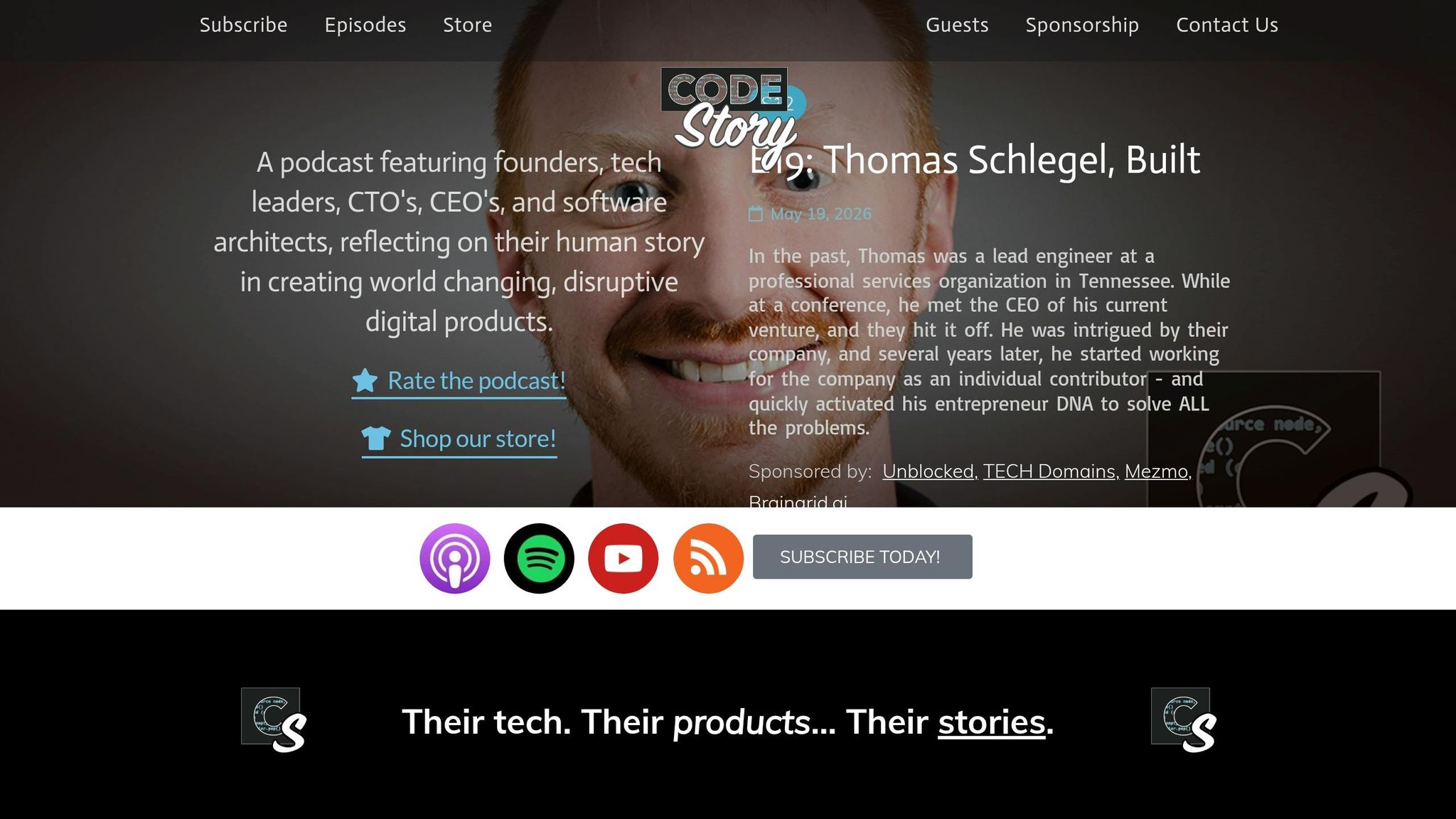
Tech leaders often provide practical advice on overcoming workflow challenges, and Code Story, hosted by Noah Labhart, is a treasure trove of these insights. The podcast features founders and executives sharing their journeys, offering actionable solutions to common problems in managing time and work.
Take Matt Martin, the co-founder of Clockwise, as an example. He appeared on Code Story in June 2023, sharing his transition from a legal career to tech leadership. Martin highlighted a key realization: even when individuals optimize their schedules, teams still face hurdles like frequent interruptions and fragmented focus time. This led him to conclude:
"Time is not an individual problem – but a team problem to be solved." – Matt Martin, Co-founder, Clockwise
This perspective shaped Clockwise into a tool that coordinates and automates calendars for entire teams, not just individuals. It’s a powerful reminder that strategies like time blocking, delegation, and energy management only deliver their full potential when teams adopt them collectively.
Another compelling episode features Naomi Chopra, founder of Hatica and a former Uber engineer, who appeared on the show in January 2024. Chopra addressed a widespread issue: teams bogged down by countless SaaS tools without a clear way to measure progress. His solution? Aggregating signals from tools like GitHub, Jira, and Slack into a single dashboard to provide leaders with actionable insights on team performance and well-being.
"Why don’t we build something to collect the signals from these tools, and present information to help drive velocity, alignment, and well-being." – Naomi Chopra, Founder, Hatica
Code Story episodes are free to access and typically run 30–45 minutes. These stories and strategies are not just theoretical – they’re practical solutions you can apply to your own work. Tune in to Code Story and see how these ideas work in action.
Conclusion
Managing time effectively as a tech leader takes consistent effort and discipline. Mohammed Cherifi, Founder & CEO of Hyperion Consulting, emphasizes this idea perfectly:
"The Eisenhower Matrix is not a one-time exercise. It is a weekly discipline. The leaders who master it reclaim 10-15 hours per week."
Key strategies like setting clear priorities, using time blocking, delegating wisely, improving communication habits, and managing your energy are most effective when practiced regularly. Without this consistency, calendars can become chaotic, task lists can lose relevance, and old, unproductive habits can creep back in. To prevent this, a periodic reset – whether weekly or quarterly – can help fine-tune your system, ensuring it stays aligned with your most important goals. This regular adjustment not only sharpens focus but also supports long-term leadership success.
Leadership isn’t about being endlessly busy; it’s about making thoughtful decisions and building a strong team. By realigning your priorities and applying practical tools like time blocking and delegation, you can maintain both effectiveness and flexibility. Start small – review one time block or delegate a single task you’ve been putting off – and build from there. The aim isn’t perfection, but a system that adapts to your needs and grows with your responsibilities.
FAQs
How do I pick my leadership buckets?
To organize your leadership focus, start by grouping your tasks into broad categories that align with your priorities. For instance, you might create buckets such as features (developing new initiatives), debt (addressing existing problems), and toil (handling routine or repetitive work). A tool like the Eisenhower Matrix can be useful for sorting tasks based on their urgency and importance. Make it a habit to review and refine these categories regularly to ensure they align with your evolving goals and responsibilities.
What’s the fastest way to do a time audit?
The fastest way to conduct a time audit is by examining your calendar or activity log from the past week. Break down your tasks into categories such as strategy, meetings, or focused work. Then, evaluate how much time you’ve dedicated to high-priority tasks versus lower-priority ones. This straightforward review gives you a clear picture of how your time is being spent, making it easier to adjust your schedule effectively.
How do I protect deep work from Slack and meetings?
To protect your time for deep work, set up dedicated focus blocks during your most productive hours and mark them as “Private” or “Out of Office” on your calendar. Use features like “Do Not Disturb” and auto-decline settings to cut down on interruptions. Establish clear guidelines for what counts as urgent versus non-urgent communication, and promote asynchronous messaging whenever possible. If you’re interrupted, politely let others know when you’ll respond, and consider adopting practices like no-meeting days to keep distractions to a minimum.