When your system struggles to handle traffic, you have two scaling choices: vertical scaling (upgrading a single server) or horizontal scaling (adding more servers). Each approach has pros and cons, depending on your workload, business goals, and technical setup.
Key Takeaways:
- Vertical Scaling: Simple to implement but limited by hardware capacity. Best for stateful apps, steady traffic, or small-scale systems.
- Horizontal Scaling: Adds capacity by distributing the load across multiple servers. Ideal for stateless apps, unpredictable traffic, or high uptime needs.
- Hybrid Approach: Combine both methods for flexibility, such as vertical scaling for databases and horizontal scaling for web servers.
Quick Comparison:
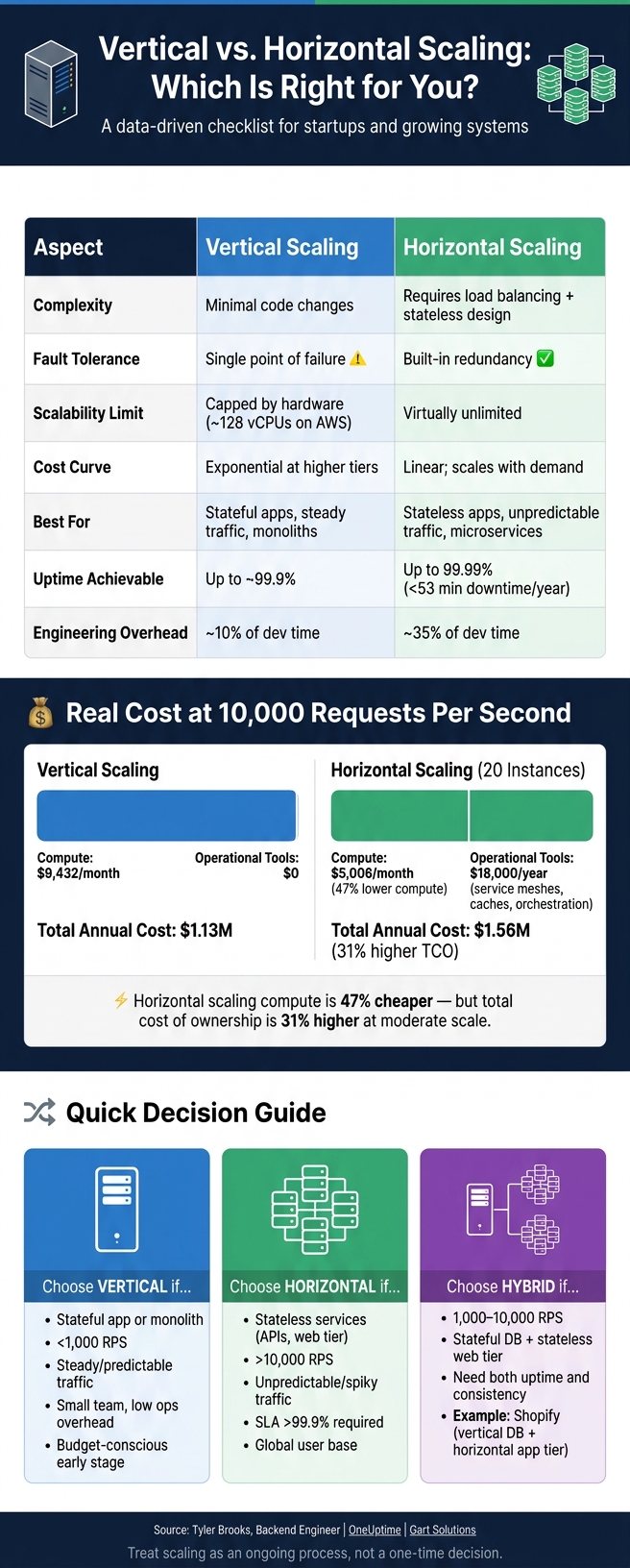
| Aspect | Vertical Scaling | Horizontal Scaling |
|---|---|---|
| Complexity | Minimal code changes | Requires load balancing, stateless design |
| Fault Tolerance | Single point of failure | Built-in redundancy |
| Scalability Limit | Capped by hardware | Virtually unlimited |
| Cost Curve | Exponential at higher tiers | Linear; scales with demand |
Pro Tip: Start with vertical scaling for simplicity, then move to horizontal scaling as traffic grows or reliability becomes critical.
Vertical vs Horizontal Scaling: Cost, Reliability & Performance Compared
Horizontal Vs. Vertical Scaling: Which One Is Right For Your AWS Setup?
sbb-itb-772afe6
Clarifying Your Workload and Business Context
Before diving into infrastructure setup, it’s crucial to pinpoint your workload and business needs. Skipping this foundational step can lead to APIs that are overbuilt or databases that can’t handle the load.
Defining the Workload
Start by considering whether your service is stateless or stateful. This distinction shapes your scaling strategy:
- Stateless services (e.g., REST APIs using Redis for session storage or JWT tokens) are perfect for horizontal scaling. Any instance can handle any request, making it easy to add or remove capacity as needed.
- Stateful services, like those that rely on local filesystems, in-memory data, or complex relational queries, are tougher to distribute. These often benefit from vertical scaling as a starting point.
Traffic patterns also play a significant role in your approach. For example:
- A steady, predictable load (like a 9-to-5 internal tool) leans toward vertical scaling for its simplicity and cost-effectiveness.
- Services with sudden traffic spikes – think flash sales or viral campaigns – are better suited for horizontal scaling with auto-scaling features. Tools like AWS CloudWatch can help you analyze whether your traffic is static, periodic, or unpredictable before you commit.
Another factor is your existing deployment model. For instance:
- Legacy monoliths are typically limited to vertical scaling unless you’re ready for an expensive overhaul.
- Containerized environments (e.g., Kubernetes) are built for horizontal scaling, offering flexibility and elasticity.
Here’s a quick summary to guide your decisions:
| Workload Type | Recommended Direction | Why |
|---|---|---|
| Stateless API / Web Tier | Horizontal | Any instance can serve any request |
| Relational Database (Primary) | Vertical | Ensures ACID compliance and data consistency |
| Batch / Worker Pools | Horizontal | Jobs can be distributed across workers |
| Legacy Monolith | Vertical | Avoids costly and risky refactoring |
| Global User Base | Horizontal | Supports geographic distribution |
Beyond technical considerations, your business context – such as uptime requirements, budget constraints, and regulatory obligations – will further refine your scaling strategy.
Evaluating Business Constraints
Scaling isn’t just a technical decision; it needs to align with your business goals. Three key factors often influence these decisions: uptime targets, budget, and regulatory requirements.
- Uptime: If your SLA demands over 99.9% uptime (less than 53 minutes of downtime annually), a single-node vertical setup won’t cut it. Multi-zone horizontal scaling becomes essential.
- Budget: Vertical scaling is often cheaper at the start but becomes costly at higher hardware tiers. Companies that adopt horizontal auto-scaling with tiered purchasing strategies have reported cutting compute costs by 40% to 65% compared to static vertical setups. However, static vertical setups can also lead to waste, with 20% to 30% of cloud spend often going toward idle or over-provisioned resources.
- Regulations: Industries like finance and healthcare often require strong data consistency and reliable audit trails, which favor vertical scaling. On the other hand, data residency rules (e.g., keeping EU user data within the EU) may necessitate horizontal scaling to deploy region-specific nodes.
To keep your decisions organized, consider maintaining a decision log for each service. Document why a particular scaling strategy was chosen, your uptime goals, acceptable maintenance windows, and any regulatory requirements. This record can be a lifesaver as your team grows, your architecture evolves, or you need to revisit past choices. Many tech leaders share similar stories of navigating these architectural pivots during rapid growth.
"The question is never ‘which scaling approach is better?’ – it’s ‘which scaling approach is right for this workload, at this tier, at this stage of growth?’ Mature infrastructure scalability requires architectural nuance, not dogma." – Fedir Kompaniiets, Co-founder, Gart Solutions
Evaluating Technical Constraints for Scaling
Assessing Statefulness and Data Handling
One of the biggest challenges to horizontal scaling is dealing with local state. If your application relies on storing session data in process memory, saving files to a local disk, or using local caches, scaling out becomes tricky. Why? Because requests routed to a different instance won’t have access to that data, leading to issues like random logouts or disrupted workflows.
To determine whether your application is storing sessions locally, you can use system commands to check. If you get a non-zero result, it means your app is writing sessions locally, and it’s not ready for horizontal scaling without some adjustments.
The fix? Externalize the state. Here’s how:
- Move session storage to services like Redis or Memcached (for PHP, you can configure
session.save_handler = redis). - Shift file uploads to object storage solutions like Amazon S3.
- Replace local caches with a distributed caching layer.
Until you’ve made these changes, vertical scaling (adding more resources to a single instance) is the safer option.
"Horizontal scaling only works when any instance can handle any request. That means no local state." – Codelit Team
| Component | Not Ready for Horizontal | Ready for Horizontal |
|---|---|---|
| Sessions | Local memory / filesystem | Redis / Memcached / JWT tokens |
| File uploads | Local SSD | S3 / GCS / object storage |
| Caches | Local caches | Distributed (Redis, Memcached) |
| Database | Single large instance | Read replicas / sharding |
Once you’ve externalized state, the next step is identifying what’s actually slowing your system down.
Identifying Performance Bottlenecks
After dealing with state, it’s time to figure out where your system is hitting its limits. Scaling the wrong resource won’t help – for instance, adding CPU cores won’t solve a bottleneck caused by slow disk I/O.
Here’s how to pinpoint bottlenecks:
- Use tools like
topormpstatto monitor CPU usage. - Run
iostat -xto check for disk I/O saturation. - Use
sar -n DEVto track network bandwidth.
Depending on what you find, here’s what to do:
- High CPU usage (>80%): Add more cores or scale out with additional instances.
- High I/O wait (>15%): Upgrade to faster storage (like NVMe) or implement read replicas.
- Memory pressure (e.g., high swap activity): Add more RAM.
- Lock contention: Optimize queries or introduce partitioning.
For example, PostgreSQL struggles with performance once you exceed 64 cores. In fact, moving from 64 to 128 cores can cause a 40% performance drop due to lock contention. So, simply upgrading to a larger instance isn’t always the answer.
Another key factor: if your traffic fluctuates significantly (e.g., a peak-to-trough ratio greater than 3:1), horizontal auto-scaling might be the best solution. It lets you adjust capacity based on demand rather than over-provisioning for peak usage.
Platform and Architecture Readiness
Even if your application is stateless, your platform must support horizontal scaling effectively. Here are some things to consider:
Modern infrastructure relies heavily on containerization and orchestration tools like Kubernetes. These tools are designed for horizontal scaling but come with added complexity. For example, microservices scaled horizontally tend to experience 3.5 times more production incidents per month compared to monolithic setups. This means your team needs to be ready to handle the operational challenges.
Also, don’t overlook connection pooling. As you add instances, the overall connection count increases. Tools like PgBouncer or RDS Proxy can help manage this.
Finally, think about cold start latency. Containers can take anywhere from 2 to 30 seconds to start, while provisioning a new node might take 1 to 5 minutes. If your app experiences sudden traffic spikes – like during a flash sale – horizontal auto-scaling alone might not react quickly enough. A better approach is to combine a pre-warmed baseline (vertical scaling) with burst capacity (horizontal scaling).
"If a service can’t parallelize, autoscaling just creates more copies of the problem." – TheLinuxCode
These technical considerations are critical to ensure your scaling strategy is effective and reliable.
Making the Scaling Decision: Vertical, Horizontal, or Mixed
Choosing the right scaling approach depends on your system’s workload and technical requirements. Use these guidelines to identify the best fit for your needs.
Vertical Scaling Decision Checklist
Vertical scaling works well when your system is stateful, traffic patterns are steady, and simplicity is a priority. This approach is particularly suited for monolithic systems handling less than 1,000 RPS, where the focus is on quick implementation and minimal changes.
| Pros | Cons |
|---|---|
| Easy to implement – just resize the instance | Creates a single point of failure |
| No need for code modifications | ~5 minutes of downtime during upgrades |
| Low operational overhead | Limited by hardware constraints (e.g., ~128 vCPUs on AWS) |
| Predictable costs for moderate scaling | Costs rise sharply at higher tiers |
One major limitation of vertical scaling is the "hard ceiling." For example, on AWS, upgrading from a 36-core instance ($1.31/hr) to a 128-core instance ($6.08/hr) results in a 460% cost jump for only 3.5x more compute power. When you approach these limits, it’s time to explore other options.
If vertical scaling no longer meets your needs, horizontal scaling might be the next step.
Horizontal Scaling Decision Checklist
Horizontal scaling is ideal for stateless architectures, strict uptime requirements, or highly variable traffic. If your system needs to handle sudden traffic spikes or maintain an SLA above 99.9%, horizontal scaling with multi-zone deployment becomes essential.
However, this approach comes with its own challenges. Microservices in a horizontally scaled setup can lead to 3.5x more production incidents per month compared to monolithic architectures. Additionally, the total cost of ownership often includes hidden expenses.
| Pros | Cons |
|---|---|
| Zero downtime through rolling updates | Increased operational complexity |
| Built-in redundancy and fault tolerance | Requires a stateless design |
| Virtually limitless capacity | Higher engineering effort (35% of dev time vs. 10%) |
| Costs grow linearly with added nodes | Hidden expenses: load balancers, orchestration tools, etc. |
"For any SLA above 99.9%, horizontal scaling with multi-zone deployment is effectively mandatory." – OneUptime
Mixed and Diagonal Scaling Strategies
As systems grow, a mix of vertical and horizontal scaling often becomes necessary. Most mature setups don’t stick to one method indefinitely. A common approach is to scale vertically first and then transition to horizontal scaling when a single node reaches 70–80% utilization or when costs become prohibitive.
Real-world examples highlight this hybrid strategy. For instance, Stripe uses high-performance vertical instances for its PostgreSQL databases while scaling its API servers horizontally. Similarly, Shopify employs a tiered model to handle flash sales while maintaining data consistency.
Here’s a quick reference to match scaling strategies with different scenarios:
| Scenario | Recommended Approach |
|---|---|
| < 1,000 RPS | Vertical – prioritize simplicity |
| 1,000–10,000 RPS | Hybrid – add read replicas, optimize single-node |
| > 10,000 RPS | Horizontal – necessary for this level of traffic |
| Highly variable traffic | Horizontal with predictive auto-scaling |
| Stateful DB + stateless web tier | Tiered: vertical for DB, horizontal for app layer |
"Vertical scaling can buy time and simplicity, while horizontal scaling helps resilience and load distribution when the workload and operations justify the complexity." – Tyler Brooks, Backend Engineer
Cost and Reliability Considerations
When you’ve assessed your workload and technical constraints, the next step is to weigh reliability risks and cost projections. These factors play a key role in determining your scaling strategy.
Reliability and Failure Modes
The primary reliability concern with vertical scaling is simple: a single server represents a single point of failure. If that server crashes, everything comes to a halt. Additionally, most hardware upgrades for vertical scaling require planned downtime. While this might be manageable for internal tools, it’s a serious issue for customer-facing applications.
Horizontal scaling changes the game. If one node fails, traffic is automatically redirected to the remaining nodes. With a well-designed multi-zone deployment, distributed systems can achieve 99.99% uptime, equating to less than 53 minutes of downtime per year. However, horizontal scaling isn’t without its challenges. It typically leads to more operational incidents each month, and maintaining data consistency across distributed nodes demands careful planning and execution.
"The question is never ‘which scaling approach is better?’ – it’s ‘which scaling approach is right for this workload, at this tier, at this stage of growth?’ Mature infrastructure scalability requires architectural nuance, not dogma." – Fedir Kompaniiets, Co-founder, Gart Solutions
Reliability decisions are just one side of the coin – scaling also has a direct impact on your budget and growth strategy.
Cost and Growth Projections
When analyzing costs, horizontal scaling appears cheaper in terms of compute, with 47% lower compute costs. However, the total cost of ownership for horizontal scaling can be 31% higher than vertical scaling at moderate scales. This is due to added expenses like service meshes ($15,000/year), distributed caches ($3,000/month), and orchestration tools.
Here’s a cost breakdown for 10,000 requests per second (RPS):
| Cost Factor | Vertical Scaling | Horizontal Scaling (20 Instances) |
|---|---|---|
| Compute | $9,432/month | $5,006/month |
| Operational Tools | $0 | $18,000/year |
| Engineering Overhead | 10% of dev time | 35% of dev time |
| Total Annual Cost | $1.13M | $1.56M |
Source:
A helpful guideline: horizontal scaling becomes cost-effective per compute unit only when you exceed 32–64 vCPUs. For workloads below that threshold, vertical scaling is often the better choice financially. For applications with fewer than 10,000 monthly active users, a single well-provisioned server (costing $14–$120/month) is usually the simplest and most economical solution.
"The numbers don’t lie – vertical scaling often wins on total cost of ownership, especially at moderate scales." – Tyler Brooks, Backend Engineer
Implementation Readiness
With reliability and costs understood, the next step is ensuring your infrastructure is ready for scaling. Robust observability is essential – making scaling decisions without proper monitoring is like flying blind. Metrics like CPU usage, memory, and I/O should feed into a dashboard (popular tools include Prometheus and Grafana), and automated alerts should be configured to detect potential issues early.
For horizontal scaling, predictive auto-scaling can cut cloud costs by 35% during off-peak times. This requires advanced tooling that goes beyond basic CPU thresholds, using metrics like queue depth or orders per minute to fine-tune scaling triggers. Vertical scaling, on the other hand, can provide a simpler way to buy time while you build out these capabilities without introducing additional operational complexity.
Conclusion: Applying This Checklist to Your Startup
This checklist is designed to help you align your scaling strategy with the specific needs and growth patterns of your startup.
Key Takeaways
When scaling, consider your workload, growth trajectory, team capacity, and budget. A structured approach – starting with defining workloads and assessing technical limitations – can guide better decisions.
For stateful workloads, vertical scaling often works best initially since it simplifies consistency by operating on a single node. On the other hand, stateless services thrive with horizontal scaling, especially when traffic patterns are unpredictable. A hybrid approach can be the right choice when both high availability and data integrity are essential. Shopify’s setup is a great example: their application tier scales horizontally to manage surges of up to 50,000 concurrent shoppers per merchant, while their databases scale vertically using high-memory instances to maintain performance and data integrity.
Cost considerations also highlight the importance of treating scaling as an ongoing process, not a one-time setup. Regularly revisiting your strategy ensures it evolves with your application’s needs.
"The most important recommendation is to treat scaling as an ongoing process, not a one-time decision. Review your scaling strategy quarterly and adjust based on actual usage patterns." – Tyler Brooks, Backend Engineer
Set clear "stop rules", such as cost or performance thresholds, to signal when it’s time for an architectural review. As your application scales and requirements change, these principles will help keep your approach aligned with your goals.
Learning from Other Tech Leaders
Scaling decisions are rarely straightforward – they’re influenced by business goals, team expertise, funding limitations, and lessons learned from past challenges. Platforms like Code Story provide a behind-the-scenes look at how tech leaders – founders, CTOs, and architects – navigate these decisions. Their stories emphasize the importance of regular reviews and adapting strategies over time. For actionable advice and real-world examples, check out conversations with tech leaders on Code Story.
FAQs
What are the fastest ways to make my app stateless for horizontal scaling?
To transition your app to a stateless architecture efficiently, start by externalizing session data. This means shifting session information from application servers to shared storage solutions like Redis or databases. Additionally, ensure that every request carries all the required details so any server in your system can handle it without depending on local session storage. This method not only removes the dependency on individual servers but also enables smoother horizontal scaling and keeps the system adaptable to changes.
Which metrics should trigger scaling (CPU, memory, I/O, or queue depth)?
When it comes to scaling, certain metrics act as clear indicators that it’s time to adjust resources. Key metrics include CPU utilization, memory utilization, I/O operations, and I/O queue depth. In cases involving queue-based scaling, queue depth becomes especially important. These metrics reveal when resources are maxed out or when workloads are pushing limits, signaling that scaling is necessary once predefined thresholds are crossed.
When should I switch from vertical scaling to a hybrid or horizontal setup?
When vertical scaling hits a wall or starts becoming inefficient, it might be time to consider a hybrid or horizontal setup. Some clear indicators include reaching the maximum hardware capacity, dealing with unpredictable traffic spikes, rising costs, or when further upgrades just aren’t practical.
Horizontal scaling offers a more adaptable approach, providing redundancy and almost linear growth in capacity. This makes it a smart choice when vertical scaling no longer delivers the performance or cost-effectiveness you need.