
Cloud migration can revolutionize your operations, but it comes with a critical challenge: data compliance. Whether you’re dealing with HIPAA, GDPR, or CCPA, failing to meet regulatory standards can lead to hefty fines, operational setbacks, and loss of trust. Here’s a quick breakdown of what you need to know:
- Compliance isn’t automatic: Using a compliant cloud provider doesn’t guarantee your compliance. You still manage data access, classification, and audit controls.
- Understand your responsibilities: Regulations vary by industry and location (e.g., HIPAA for healthcare, GDPR for EU users). Know your role in the shared responsibility model – whether you’re using IaaS, PaaS, or SaaS.
- Plan ahead: Create a data inventory, classify data by sensitivity, and map data flows to identify risks before migration.
- Build compliance into your architecture: Choose appropriate cloud regions, enforce encryption, and apply strict access controls.
- Monitor continuously: Set up automated tools to detect and prevent non-compliance after migration.
Treat compliance as an ongoing process, not a one-time task. Many tech leaders share similar challenges when scaling secure infrastructure. This guide outlines how to navigate regulations, design secure systems, and maintain compliance throughout your cloud journey.
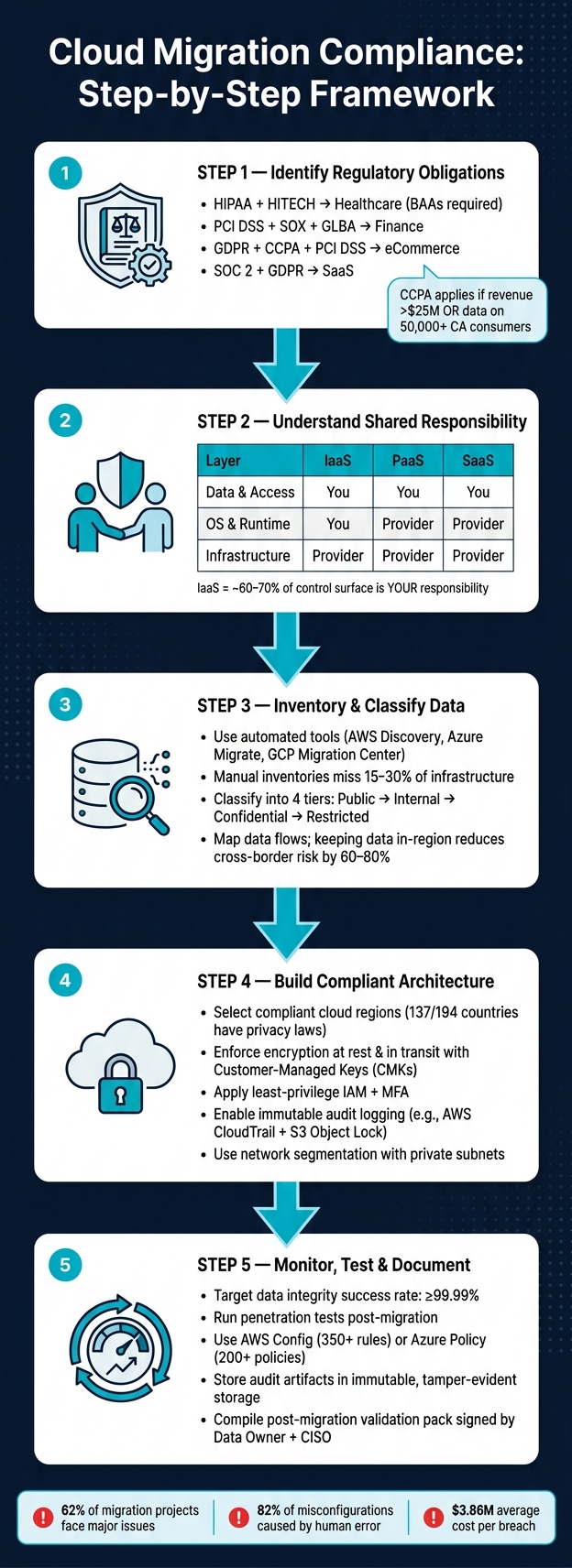
Cloud Migration Compliance: Step-by-Step Framework
Regulatory Requirements and Shared Responsibility Models
Identifying Your Regulatory Obligations
Your compliance requirements hinge on two main factors: the type of data you manage and where your users are located – not just the location of your company headquarters. For example:
- A U.S.-based startup serving European users must adhere to GDPR.
- Businesses processing payments need to meet PCI DSS standards.
- Healthcare apps fall under HIPAA and HITECH regulations.
Beyond general privacy laws, industry-specific rules can add complexity. For instance, healthcare organizations are required to sign Business Associate Agreements (BAAs) with their cloud providers. SaaS companies often pursue SOC 2 certifications and must disclose sub-processors in their Data Processing Agreements (DPAs). Meanwhile, financial services firms face stringent requirements under SOX and GLBA, including record retention rules.
Here’s a quick breakdown of key regulations by industry:
| Industry | Key Regulations | Core Cloud Requirement |
|---|---|---|
| Healthcare | HIPAA, HITECH | Business Associate Agreements (BAAs) |
| Finance | PCI DSS, SOX, GLBA | Transaction monitoring & record retention |
| eCommerce | GDPR, PCI DSS, CCPA | Cookie consent & payment isolation |
| SaaS | SOC 2, GDPR | Sub-processor disclosure & DPAs |
One regulation that often surprises startups is CCPA. It applies if your company meets any of these criteria:
- Earns more than $25 million in gross annual revenue
- Buys or sells data on 50,000 or more California consumers
- Derives 50% or more of its revenue from selling consumer data
Many small businesses mistakenly assume they’re exempt, only to face compliance issues later. Once you’ve identified your regulatory requirements, it’s crucial to determine which compliance controls are your responsibility versus those handled by your cloud provider.
Understanding the Shared Responsibility Model
Using a certified cloud provider doesn’t automatically make your business compliant.
"Misreading where provider responsibility ends and customer responsibility begins is one of the most documented causes of cloud compliance failures." – Cloud Compliance Authority
The responsibilities you carry depend on the service model you choose. Here’s how it breaks down:
- IaaS (Infrastructure as a Service): For platforms like AWS EC2, you’re responsible for the operating system, applications, network controls, and data – covering roughly 60–70% of the control surface.
- PaaS (Platform as a Service): With tools like AWS RDS, the provider manages the OS and runtime, but you handle data and access management.
- SaaS (Software as a Service): Providers like Odoo manage nearly everything up to the application layer, but you still oversee user access and data governance.
| Responsibility | IaaS (e.g., EC2) | PaaS (e.g., RDS) | SaaS (e.g., Odoo) |
|---|---|---|---|
| Data & Content | User | User | User |
| Access Management | User | User | User |
| Operating System | User | Provider | Provider |
| Physical Infrastructure | Provider | Provider | Provider |
To avoid gaps, consult your provider’s shared responsibility documentation – often available in their compliance portals (e.g., AWS Artifact). This will help you clearly map which controls you inherit and which ones you need to implement yourself.
Data Residency and Cross-Border Transfer Rules
Once you’ve pinned down your obligations and responsibilities, it’s time to tackle global data considerations like data residency and data sovereignty. While these terms are related, they aren’t the same:
- Data residency refers to the physical location where data is stored, as defined in your contract.
- Data sovereignty pertains to the legal jurisdiction governing that data, which isn’t always resolved by choosing a specific storage region.
This distinction is especially critical for U.S.-based companies using American cloud providers. Under the CLOUD Act, U.S. authorities can demand data from providers like AWS, Azure, or Google Cloud – even if it’s stored in international data centers like those in Frankfurt or Dublin. A recent example: In May 2023, the Irish Data Protection Commission fined Meta €1.2 billion for transferring EU personal data to U.S. servers under frameworks deemed inadequate for protecting it from such legal reach.
To stay compliant, extend your controls beyond primary data to include metadata, audit logs, and backups, as these often cross borders. Tools like AWS Service Control Policies (SCPs) or Azure Policy can help restrict resource creation to approved regions. Additionally, store encryption keys using Customer-Managed Keys (CMKs) in the same region as your data. Be aware that if a U.S.-based provider manages your keys, your residency guarantees may not hold up legally.
sbb-itb-772afe6
Preparing and Classifying Data Before Migration
Building a Data Inventory
Before migrating to the cloud, it’s crucial to create a thorough, automated data inventory. Relying on manual spreadsheet inventories often results in 15% to 30% of your infrastructure being overlooked. These gaps can lead to compliance issues that might only come to light during an audit.
To avoid this, use automated discovery tools like AWS Application Discovery Service, Azure Migrate, or Google Cloud Migration Center. These tools scan your environment and gather metadata. For each asset, make sure to document key compliance-related fields:
| Inventory Category | Key Fields to Document |
|---|---|
| Compute | CPU cores, memory, OS version, middleware, runtime versions |
| Data Stores | Engine type, version, size, replication topology, encryption status |
| Network | IP addresses, DNS entries, firewall rules, VPN/peering connections |
| Compliance | Data owner, residency requirements, PII status, retention/disposal policy |
Additionally, review your Key Management Service (KMS) usage and confirm ownership of encryption keys. If a U.S.-based provider manages your keys, your residency guarantees could be at risk. Collect at least 30 days of CPU, memory, and disk I/O utilization data to prevent carrying over inefficient on-premises configurations to the cloud.
"The difference between success and failure is rarely about the technology… failures stem from inadequate planning, incomplete discovery, and underestimated dependencies." – Cozcore Technology
Classifying Data by Sensitivity Level
Once your inventory is complete, the next step is to classify your data based on its sensitivity. A simple four-tier classification system works well for most organizations and avoids unnecessary complexity:
| Classification Level | Examples | Required Controls |
|---|---|---|
| Public | Marketing materials, press releases, public SOC 2 reports | None/Minimal |
| Internal | Org charts, internal policies, project plans | Access control (IAM) |
| Confidential | Financial reports, customer lists, business plans | Encryption, access logging |
| Restricted | PII, health records, payment card data, API keys | Encryption at rest/in transit, audit trails, DLP |
This classification impacts your cloud architecture decisions, such as data storage regions, the use of Customer-Managed Encryption Keys (CMEK) or Hardware Security Modules (HSM), and network segmentation. Regulatory frameworks like HIPAA, PCI-DSS, and GDPR require documented classification to show that proper controls are applied to different data types. While tools like Microsoft Purview or Google DSPM can automate the initial classification, always manually validate their findings to ensure compliance.
After classifying data, map its flows to identify compliance risks and dependencies within your environment.
Mapping Data Flows and Dependencies
Mapping data flows is essential for understanding how data moves from its source to its destination. This step not only clarifies operational dependencies but also ensures compliance by identifying cross-border transfers and any control gaps.
For each dataset, trace its journey from origin to final destination. Document details like the source, transformations applied, owner, downstream consumers, and the controls in place – such as access restrictions, retention policies, encryption, and audit measures. Include sensitivity levels in your data flow diagrams to highlight which services require specific controls or regional placements.
"Architecture shows intent; process mapping shows reality." – Ethan Mercer, Senior SEO Content Strategist
If data flows cross international borders, you may need to conduct a Transfer Impact Assessment (TIA) under Standard Contractual Clauses. This ensures that the destination country provides adequate data protection. Keeping data within its region of origin – like storing EU data in EU regions – can reduce cross-border compliance challenges by 60% to 80%. This mapping exercise is one of the most impactful steps to take before starting your migration.
Building a Cloud Architecture That Meets Compliance Requirements
Selecting Cloud Regions, Services, and Account Structures
When designing a cloud environment that adheres to compliance standards, the goal is to build compliance into the infrastructure itself – not just document it after the fact.
Choosing a cloud region involves more than proximity to users. As of 2023, 137 out of 194 countries have enacted privacy or data protection laws. For U.S.-based providers, the CLOUD Act could impact data stored internationally, making regional strategy a critical consideration. Additionally, countries like China and Russia enforce strict data localization laws, such as PIPL, requiring sensitive data to be stored and processed domestically.
After selecting a region, verify that the cloud services you plan to use comply with required frameworks like FedRAMP, HIPAA, or PCI DSS. Keep in mind that services from AWS, Azure, or GCP don’t automatically meet these standards. Structuring accounts by region can help enforce compliance by preventing cross-region access. For workloads with stringent sovereignty requirements, consider sovereign cloud offerings like Azure Sovereign EU, OCI EU Sovereign Cloud, or AWS GovCloud. These environments operate under local legal frameworks and provide additional isolation. To strengthen these boundaries, apply policies such as AWS Service Control Policies or Azure Policy to block resource creation in non-compliant regions.
Once your architecture aligns with regional and service compliance needs, focus on embedding robust security measures from the outset.
Adding Security and Privacy Controls From the Start
"Compliance is often treated as an afterthought – a checklist exercise before an audit. This approach leads to expensive retroactive fixes… A better approach builds compliance controls directly into the infrastructure architecture from day one." – PrivateDevops.com
Integrating compliance controls into your architecture from the very beginning is the smartest way to avoid costly fixes later. Tools like Terraform can help codify these controls, ensuring every environment is deployed in a compliant state.
Here are some critical controls to implement right away:
- Encryption everywhere: Ensure encryption at rest and in transit for all services. Use Customer-Managed Keys (CMKs) stored in the same jurisdiction as your data, and set automated key rotation to occur at least annually to meet standards like DORA and SOC 2.
- Least-privilege IAM: Implement time-limited, cross-account roles for tasks like migrations instead of persistent credentials. Enforce multi-factor authentication (MFA) across the organization.
- Immutable audit logging: Enable centralized logging, such as AWS CloudTrail, with log file validation. Store logs in S3 Object Lock (Compliance mode) to meet HIPAA’s six-year retention requirements.
- Network segmentation: Use private subnets with strict egress controls for sensitive data processing. Define clear VPC peering rules to limit unnecessary exposure.
- Automated data retention: For GDPR’s right-to-erasure requirements, configure S3 lifecycle policies to delete or transition personal data after a set period, minimizing manual errors.
With these controls in place, you’ll be ready to formalize your migration plan with compliance checkpoints.
Creating a Migration Plan With Compliance Checkpoints
A migration plan without compliance checkpoints is incomplete. Break the migration into waves, ensuring each phase meets specific validation criteria before moving forward.
| Migration Phase | Key Compliance Checkpoint |
|---|---|
| Assessment | Verified regulatory inventory and validated data classification |
| Foundation | Landing zone validated with robust IAM, MFA, encryption, and centralized logging |
| Pilot | Migration of 2–3 non-critical apps with successful networking, DNS, and rollback testing |
| Cutover | Verification of data integrity (e.g., checksums) and passing functional/security tests |
| Post-Migration | Continuous monitoring activated with confirmed audit trails |
Start with a Wave 0 to establish your landing zone, including guardrails, centralized logging, and strong IAM policies. Then, move into a pilot phase by migrating low-risk, non-customer-facing systems. This allows you to identify and address any integration issues without risking critical data.
Two practical tips can make this process smoother: reduce your DNS TTL to 60 seconds at least 48 hours before cutover to enable quick traffic redirection if needed, and calculate data egress costs during planning. These costs can account for 15% to 25% of your projected cloud savings. Always test rollback procedures before advancing to the next wave.
"Regulatory-driven migration is not a one-off project; it’s a repeatable factory that combines policy-as-code, automated validation, and strong governance." – Jordan Lee, Senior Editor, Cloud Operations
5 Cloud Migration Traps That Kill Your IT Audit Compliance
Keeping Data Compliant After Migration
After completing a migration, the next hurdle is ensuring compliance controls remain effective. This step links back to the initial migration strategy, where these controls were first planned, emphasizing the importance of preparation and follow-through.
Testing and Validating Compliance Controls
Once the migration is complete, it’s time to confirm all controls are working as intended. Start by verifying data integrity using tools like checksums (e.g., MD5 or SHA-256), row count checks, and referential integrity tests. Aim for a success rate of at least 99.99% and a reconciliation variance of no more than 0.1%.
But compliance isn’t just about data accuracy. Conduct a penetration test on the new environment to identify vulnerabilities, particularly those stemming from temporarily elevated permissions during the migration. These permissions can sometimes linger, creating potential security risks. A thorough access review post-migration will help eliminate unnecessary privileges. Additionally, within the first 30 days of going live, perform a formal security review against your baseline controls (e.g., NIST SP 800-53 or PCI DSS) to ensure all measures remain operational.
"A migration is only successful if the new platform stays stable after cutover." – David Darmstandler, Co-CEO & Co-Founder, Datapath
Once these initial checks are complete, the focus should shift to continuous monitoring to prevent compliance issues from creeping in over time.
Setting Up Continuous Compliance Monitoring
Initial validation is just the first step in maintaining compliance. Cloud environments are dynamic – new services, configuration changes, and other factors can gradually lead to non-compliance.
A strong strategy combines preventive controls (blocking non-compliant resources before they’re created) with detective controls (identifying violations after deployment). Tools like AWS Config, with over 350 managed rules, and Azure Policy’s Security Benchmark, which includes 200+ pre-built policies, provide excellent support for these efforts. According to a 2022 report by the Cloud Security Alliance, misconfiguration remains the top cause of cloud security incidents, making automated rule enforcement critical.
When deploying policies, start with audit mode to identify potential issues, then move to deny mode once compliance is confirmed. Within the first 30 days post-migration, establish a baseline for configurations and monitor for drift. This includes both configuration drift (manual changes that bypass your IaC templates) and schema drift (unexpected structural changes in your databases). Keep an eye on encryption keys and audit logs to ensure continued compliance.
"If a control cannot be checked repeatedly and consistently, it is not really a control system. It is a snapshot." – ITU Online IT Training
Documenting Evidence for Regulators and Stakeholders
Once continuous monitoring is in place, the next priority is maintaining thorough documentation to demonstrate compliance to regulators and stakeholders.
Organize your compliance records into three categories: Governance (e.g., policies, procedures, data classification schemes), Architectural (e.g., data flow diagrams, network topology, System Security Plans), and Evidence (e.g., audit logs, access reviews, incident reports, signed attestations). For migrations, specifically, retain documents like runbooks, pre- and post-migration inventory snapshots, replication logs, and cutover timestamps to prove the migration was handled securely.
Retention requirements differ depending on the regulatory framework, so tailor your documentation strategy accordingly rather than applying a blanket approach. Store audit artifacts in immutable, tamper-evident storage, preferably offsite, to protect their integrity. Automating evidence collection through your infrastructure pipelines can save time and reduce stress during audits.
"Automate policy enforcement in CI/CD and generate cryptographically signed attestations per release. These artifacts become the fastest path to demonstrating compliance during a regulator inquiry." – Jordan Lee, Senior Editor, Cloud Operations, proweb.cloud
Finally, compile a post-migration validation pack signed by your Data Owner, CISO, and Compliance Lead. This pack should include proof of reconciliation, encryption enforcement logs, and updated architecture diagrams. It serves as a vital resource for demonstrating a secure and compliant migration to regulators or stakeholders.
Conclusion: Key Steps for a Compliant Cloud Migration
Migrating to the cloud while staying compliant requires careful planning and execution. From assessing data sensitivity and meeting regulatory requirements to designing secure systems and following a structured migration process, every step demands focused attention.
The stakes are high. With 62% of migration projects facing major issues and 82% of misconfigurations caused by human error, the average cost of breaches climbs to $3.86 million per incident. These numbers highlight why compliance can’t be treated as an afterthought.
"The key to success lies in treating compliance not as a one-time checkpoint, but as an integral part of your cloud strategy." – AWS
A successful migration hinges on a disciplined approach. This includes formal readiness assessments, accurate data classification, phased implementation with rigorous checkpoints, and consistent monitoring to ensure the environment remains audit-ready long after the migration is complete.
For firsthand advice from industry experts, check out the Code Story podcast. It features tech leaders – founders, CTOs, and architects – sharing real stories about building and scaling digital products. These candid discussions dive into the tough decisions and lessons learned during infrastructure transformations, offering invaluable insights for navigating similar challenges.
FAQs
Which compliance controls are mine vs the cloud provider’s?
The shared responsibility model splits security tasks between you and your cloud provider. While the provider takes care of infrastructure security – like physical data centers, hardware, and network controls – you’re in charge of application and data-level security. This includes tasks like managing encryption, access controls, and audit logs. Additionally, staying compliant with regulations such as HIPAA or GDPR means you need to handle contracts like BAAs (Business Associate Agreements) and DPAs (Data Processing Agreements), while actively maintaining your own controls to meet legal standards.
How do I stop data, logs, and backups from crossing regions?
To keep data, logs, and backups from moving across regions during cloud migration, take advantage of region-specific controls. This includes using data residency features, setting up storage and routing policies, and disabling cross-region replication.
Additionally, implement encryption using keys tied to specific regions and regularly monitor compliance through audit logs. Detailed documentation of data flows and storage locations is also crucial to ensure everything stays within regional boundaries and meets compliance standards.
What’s the fastest way to classify and track sensitive data before migration?
Automated discovery tools are a game-changer when it comes to identifying sensitive information across data sources. These tools scan for patterns and metadata, applying classification labels automatically. This means they can quickly pinpoint fields likely containing PII (Personally Identifiable Information), PHI (Protected Health Information), PCI (Payment Card Information), or even high-risk free-text entries.
By automating classification right at the point of data creation and using metadata tags for continuous management, you not only save time but also make tracking sensitive data much more efficient. This approach minimizes manual effort and ensures sensitive data is properly managed, especially before migration processes.