Saying "yes" to custom features can hurt your startup’s growth. While customization may help close deals and improve retention short-term, it often creates long-term problems like technical debt, slower development, and reduced scalability. Here’s what you need to know:
- Hidden Costs: Maintaining custom features can cost 15–20% of their original build price annually. These features often lack documentation, making updates difficult and time-consuming.
- Architecture Issues: Poorly designed systems can fracture under customization, with tightly coupled architectures requiring up to 4x more developer time.
- Economic Misalignment: Custom features generate one-time revenue but create ongoing maintenance costs, draining resources from core product development.
- Over-Customization Risks: Startups often confuse customer-specific requests with broader market needs, leading to fragmented products and slower growth.
How to avoid these pitfalls:
- Set a clear customization policy – prioritize features that benefit most users.
- Use modular designs and configuration-first approaches to limit custom engineering.
- Track metrics like engineering time on custom work and feature reuse rates to measure impact.
- Charge for custom requests to manage demand and align revenue with costs.
The Challenges of Customization in Startups
The Hidden Costs of Custom Features
At first glance, custom features might seem like a quick win: a customer asks for one, the team builds it, the deal closes, and everyone’s happy. But the real cost of these features doesn’t stop there. Every time the platform updates, that custom work needs testing. And since these features are often undocumented, engineers end up digging through code like archaeologists trying to understand and maintain it.
Rich Mironov, a seasoned product consultant, describes this as "customization debt":
"Customization debt is a (subtle) trade-off between closing major deals now and the long-term scalability/supportability/sustainability of our core products."
Here’s the kicker: maintaining custom software typically costs 15–20% of its original build price every year. But because these features are treated as one-off projects, they often lack proper documentation or a dedicated owner. Over time, they break, pulling core engineers away from building features that benefit the entire user base.
When enough of these customizations pile up, they start to fracture the product’s architecture, creating headaches for both developers and the business.
Product and Architecture Fragmentation
Add enough customer-specific features, and your product stops being a unified whole. Instead, it splinters into multiple, slightly different versions, each with its own quirks. The real pain comes from keeping all these variations in sync.
Imagine maintaining separate code branches for different customers. Every security patch or new feature has to be manually merged and tested across all those branches. As software architect John Freeman puts it:
"You’re maintaining more branches than a tree farm, and every single feature request becomes an archaeological expedition to figure out which customers have what."
The numbers don’t lie: 40% of development time can be spent just keeping these branches aligned. A security patch that should take two hours might stretch into two days. And when you’re dealing with tightly coupled architectures, even a small change can ripple through dozens of files, creating massive overhead. What starts as a 20% overhead in the first week can balloon to 40% within three months as more features are layered on.
These technical challenges don’t just slow down development – they also lead to financial inefficiencies.
Bottlenecks and Misaligned Economics
The architectural challenges above directly lead to economic misalignment. On paper, custom work might seem like a no-brainer: a big deal justifies a small build cost. But here’s the catch – the revenue from custom features is usually a one-time fee, while maintenance costs linger indefinitely. And since there’s rarely a budget for ongoing maintenance, these costs quietly drain R&D resources over time.
This misalignment ripples across the organization. Sales teams close deals that engineering can’t sustainably support. Deadlines slip. Margins shrink. And as the number of custom features grows, the startup’s ability to innovate slows to a crawl – a phenomenon engineers call developmental inertia. Instead of building new features, teams spend more time putting out fires. Many startup tech leaders have shared similar stories of navigating these technical crossroads. As GigaCatalyst explains:
"Every sprint spent on per-customer customization is a sprint not spent on the platform capabilities that serve all customers. That opportunity cost compounds."
The architecture decisions fueling these bottlenecks have a bigger impact than many founders realize. Here’s how different architectural patterns affect the long-term cost of customization:
| Architecture Pattern | Customization Tax | Impact on Scalability |
|---|---|---|
| Plugin Architecture | Lowest | High; changes stay contained and updates are seamless. |
| Service Layer | Medium-Low | Moderate; changes are predictable and isolated. |
| Direct DB Calls | Medium | Low; requires widespread updates across many files. |
| Tightly Coupled | Highest | Very Low; ripple effects make maintenance and upgrades difficult. |
Tightly coupled systems, for instance, can require 2–4x more developer time over a year compared to cleaner architectures. This isn’t just a technical issue – it’s a direct hit to your startup’s runway and growth potential.
sbb-itb-772afe6
Things That Don’t Scale, The Software Edition – Dalton Caldwell and Michael Seibel
Why Startups Over-Customize
Let’s take a closer look at why startups often find themselves trapped in a cycle of over-customization, building on the hidden costs and challenges discussed earlier.
Confusing Product-Market Fit with Service Fit
A common pitfall for early-stage startups is mistaking the needs of a single client for broader market demand. This confusion lies at the heart of the difference between service fit and product-market fit. Service fit occurs when a startup essentially acts as a development shop for one big client, crafting custom features to secure a deal. Product-market fit, on the other hand, means the core product addresses a problem for a larger audience – without requiring custom code for every new customer.
Big enterprise contracts often lead startups down the path of custom development. But as GigaCatalyst aptly explains:
"Every sprint spent on per-customer customization is a sprint not spent on the platform capabilities that serve all customers."
Interestingly, data suggests that churn is more often caused by low product adoption than by missing features. In other words, startups frequently invest in custom work to address retention issues that custom work alone can’t solve.
This misunderstanding opens the door to even more pressure from both customers and internal sales teams.
Pressure from Customers and Sales Teams
Sales teams are laser-focused on closing deals, which is understandable. The challenge arises when a large enterprise makes a custom feature a condition for signing a contract. To get engineering buy-in, the sales team might pitch the request as a "one-time project." Product consultant Rich Mironov sheds light on this dynamic:
"Revenue trumps technical arguments."
He also highlights the high stakes involved: "Failing to close major deals often means layoffs." This creates intense pressure to agree to custom requests. For example, a sales team might justify a feature by framing it as an $800,000 deal against a $20,000 development cost – a tempting 40x return. But this calculation often ignores the ongoing costs of maintaining that custom feature.
Over time, this approach leads to a buildup of customization debt. Features are scattered across different teams – tiger teams, field engineers, consultants – without a centralized record of what was built or why.
While external demands play a big role, internal technical challenges make the problem even worse.
Immature Technical Architecture
On top of external pressures, startups often face technical limitations that make over-customization almost unavoidable. Legacy codebases and poorly structured systems create an environment where even small customizations can become massive, risky projects. For example, if authentication, billing, and organizational logic are tightly intertwined, adding a custom login flow might require changes across unrelated systems.
This lack of clear boundaries in the codebase is what makes immature architecture so risky. Small requests can snowball into major challenges. Nearly 60% of software projects encounter scalability or integration issues when the architecture isn’t designed with long-term growth in mind. And as previously mentioned, tightly coupled systems can cost 2–4x more in developer time over a year compared to modular systems.
StarterPick sums it up well:
"The customization tax is the ongoing cost of working around a boilerplate’s architectural decisions."
Without a modular architecture or a plugin layer, there’s no safe way to handle custom work. It ends up scattered throughout the app, leaving startups over-customized – not intentionally, but as a consequence of their technical limitations.
Strategies for Scalable Customization
To tackle the challenges of over-customization, startups need to focus on strategies that scale effectively. Here’s how to approach it.
Build a Customization Policy and Decision Framework
One of the best ways to avoid runaway customization is to set clear boundaries from the start. A well-defined policy helps you decide what to build and what to skip, especially when a sales team requests a one-off feature or a big client demands something unique.
Start with a strategic alignment filter: only invest in custom features if they benefit the majority of your users or give you a clear edge in the market. For everything else, rely on low-code tools or a configuration layer instead of adding it to your core engineering roadmap.
The 80/20 Default Rule is another useful guideline – ensure your product addresses 80% of use cases right out of the box. Pair this with the Documentation Litmus Test: if you can’t explain a feature clearly in your documentation, it’s probably not scalable.
Finally, shift your focus from creating custom solutions to developing configurable components that protect the integrity of your core product.
Use a Configuration-First Approach
Instead of coding new solutions for every customer request, focus on creating modular primitives – reusable components that can be combined in different ways. Think of it like building with LEGO bricks: the pieces stay the same, but customers can assemble them to suit their needs.
The key is distinguishing between configuration and custom engineering. Requests that can be addressed using existing primitives are handled as configurations. Anything beyond that becomes custom work or consulting. This approach safeguards your roadmap and keeps your margins intact.
"The critical distinction is between ‘we can do anything’ (consulting, which destroys margins) and ‘we have prepared primitives that snap together’ (soft product, which delivers consulting exactness with software speed and margins)." – knowledgelib.io
On the technical side, moving integration logic out of your codebase and into a database as declarative data – using tools like JSONata – lets you support countless customer-specific variations without deploying new code. These configurations are stored as versioned strings in a database and can be updated instantly.
This configuration-first mindset naturally leads to a modular and extensible architecture.
Design for Modularity and Extensibility
A modular architecture is the backbone of scalable customization. Without it, even small custom requests can disrupt unrelated systems in a tightly coupled codebase. The solution? Isolate custom features from your core product.
A plugin architecture is a great way to achieve this. Features like authentication, billing, and business logic can be kept in separate packages. This approach minimizes the risk of cascading updates, unlike tightly coupled systems, which can demand 2–4x more developer time over a year due to a "customization tax".
For multi-tenant B2B products, one decision is critical: implement Row-Level Security (RLS) from day one. Retrofitting tenant isolation later can cost up to 10x more than the initial investment and monopolize your engineering team’s time for months.
Tools and Metrics to Track Customization
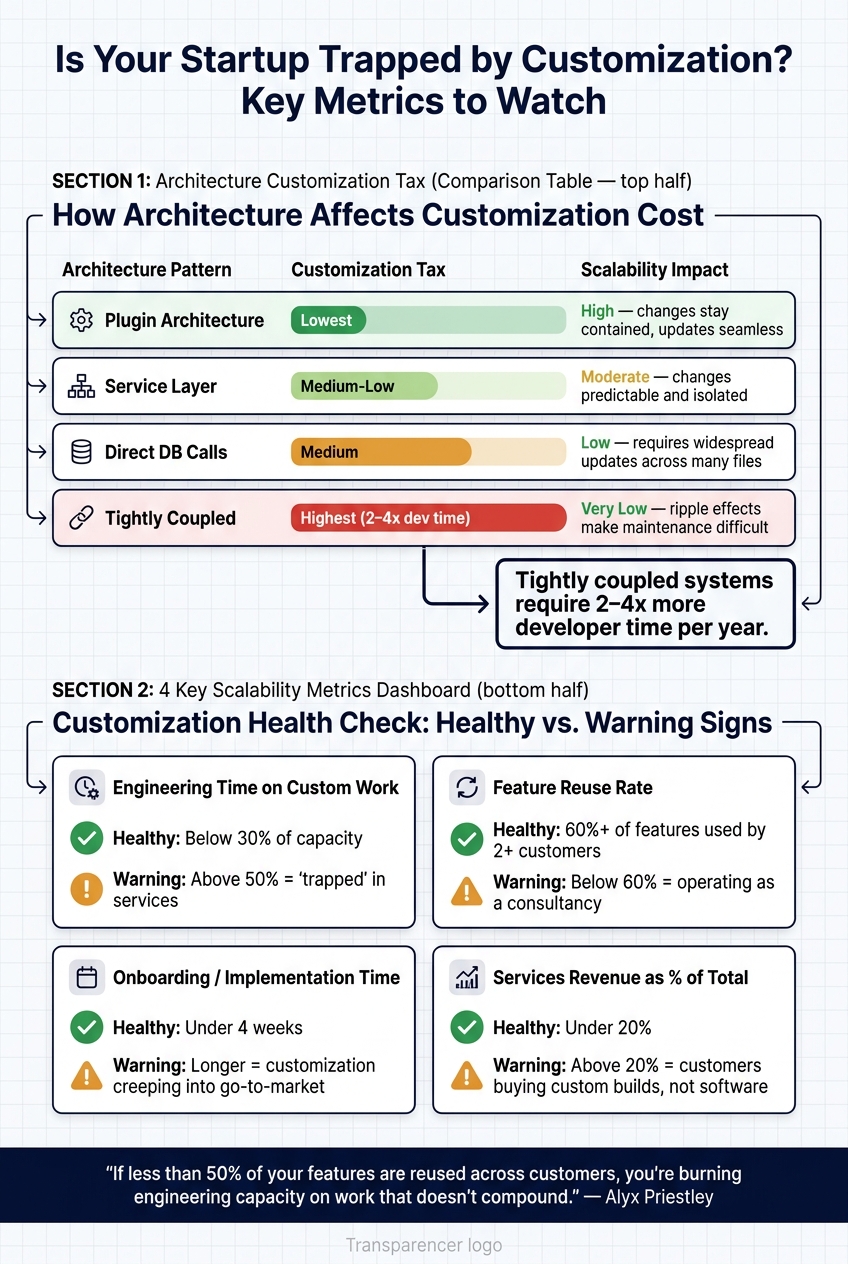
Customization Scalability Metrics: Healthy vs. Warning Thresholds for Startups
Set Limits on Custom Work and SLA Commitments
Even the most efficient modular architecture can falter if custom work flows unchecked. To avoid this, set clear boundaries on the amount of custom work your team can handle. A practical approach? Cap the engineering hours allocated to custom requests during each sprint. This forces teams to prioritize and ensures core roadmap progress stays on track.
Pricing is another powerful tool for managing custom work. By charging for custom requests, you naturally filter out less serious demands. As product expert John Cutler aptly notes:
"The money you spend on engineering is probably the least of your concerns when it comes to thinking about ROI."
The real challenge lies in opportunity cost – every custom request diverts resources from scalable development. For those requests that justify the cost, consider structuring them as contract expansions or premium packages instead of treating them as one-off fees. This approach helps maintain a revenue model aligned with software businesses (valued at 8–12x revenue) rather than services businesses (valued at just 2–3x revenue). These limits are essential for accurately measuring the impact of customization.
Measure How Customization Affects Scalability
Once limits are in place, the next step is tracking how customization impacts your scalability. Relying on intuition won’t cut it – you need hard data. Four key metrics provide a clear picture of whether customization is helping or hindering your growth:
| Metric | Healthy Threshold | Warning Sign |
|---|---|---|
| Engineering time on custom work | Below 30% of capacity | Above 50% = "trapped" in services |
| Feature reuse rate | 60%+ of features used by 2+ customers | Below 60% = operating as a consultancy |
| Onboarding/implementation time | Under 4 weeks | Longer = customization in go-to-market |
| Services revenue as % of total | Under 20% | Above 20% = customers buying custom builds |
In addition, keep tabs on maintenance debt. This can be done by tracking the number of custom code branches or one-off features in your codebase. Pair this with a Customization P&L, which maps the full cost of each custom request – including engineering, UX, support, and hosting – against the revenue it generates.
Alyx Priestley sums this up perfectly:
"If less than 50% of your features get reused across customers, you’re burning engineering capacity on work that doesn’t compound."
Learn from Founders Who Got It Right
Metrics are invaluable, but real-world experience adds another layer of insight. Several startup founders have shared their journeys navigating the balance between customization and scalability on the Code Story podcast. Episodes featuring Thomas Schlegel (Built), Nikunj Bajaj (True Foundry), Brandon Card (Terzo), Pukar Hamal (SecurityPal AI), and Dylan Ratcliffe (Overmind) offer practical lessons on maintaining product integrity while serving customer needs. Their stories highlight a common theme: the startups that scale successfully don’t say yes to every request – they build systems that allow them to say yes strategically.
Conclusion: Turning Customization into a Scalable Advantage
When customization is left unchecked, scalability takes a hit. Startups often fall into the trap of customizing reactively, without a structured plan, which only adds to their technical debt. However, when approached thoughtfully, customization can create a powerful edge. This ties back to earlier discussions about managing customization wisely to steer clear of unnecessary technical complications.
The mindset shift here is crucial – customization shouldn’t be treated as merely a favor to customers. Instead, it should be seen as a deliberate, strategic product decision. Cody Yurk of Up North Media captures this idea perfectly:
"Custom software becomes strategic when it shapes business operations."
Looking at real-world success stories, the value of controlled customization becomes evident. Take the example of UpKeep, a CMMS platform. In April 2026, they integrated a white-label AI app builder from Gigacatalyst into their product. This allowed over 1,000 non-technical maintenance teams to create more than 670 custom microapps – tools like drum rotation trackers and shift handoff solutions. The results were impressive: a 90.8% adoption rate and 89% day-30 retention among users who built their own apps. And all of this was achieved without adding to their engineering team’s workload.
A critical question arises: who should own the customization layer? Should it be your engineering team, a third-party provider, or even your customers? Handing over this responsibility to the right party can transform customization from a resource drain into a strategic advantage.
With the custom software market expected to hit $146.18 billion by 2030, growing at a 22.6% annual rate, startups that focus on building a smart customization layer and maintaining clean architecture will be well-positioned to leverage customization as a competitive edge.
FAQs
When should we say no to a custom feature?
If a custom feature doesn’t align with your core business goals, existing solutions can handle the job, or the cost to build and maintain it over five years outweighs the cost of buying, it’s better to pass on it. This becomes even more critical when switching costs are steep or your team is unable to manage the trade-offs effectively.
How can we support customization without custom code?
To make customization accessible without relying on custom code, focus on building your platform with a metadata-driven architecture. This design enables users to adjust settings, themes, or workflows without touching the underlying code, keeping things simple and user-friendly.
On top of that, offer robust APIs, SDKs, and extension points. These tools empower users to implement secure and flexible customizations, such as branding tweaks or third-party integrations. By adopting this strategy, you can minimize technical debt, maintain scalability, and cater to a wide range of client needs – all while supporting long-term growth.
What metrics show customization is impacting scalability?
Signs that customization might be hampering scalability include highly coupled code (like massive files with too many lines of code), disorganized data access that demands constant updates, and greater effort needed to introduce new features or accommodate additional customers. These issues drive up maintenance costs and slow down development, creating roadblocks for startups trying to grow efficiently.