The right tools can make or break your software development process. They save time, reduce errors, and improve collaboration, helping teams deliver high-quality code efficiently. This article highlights five tools – GitHub Copilot, JetBrains IDEs, Jira Software, GitLab, and Code Story – that address common challenges in coding, project management, and deployment.
Key Takeaways:
- GitHub Copilot: AI-driven code suggestions that speed up coding and integrate with popular editors.
- JetBrains IDEs: Advanced coding environments tailored to specific languages with debugging and refactoring features.
- Jira Software: A project management tool for tracking issues, planning sprints, and visualizing progress.
- GitLab: Combines source code management, CI/CD, and project tracking in one platform.
- Code Story: Focuses on automating repetitive tasks and improving team collaboration.
Quick Comparison
| Tool | Key Features | Pricing |
|---|---|---|
| GitHub Copilot | AI code suggestions, PR automation | Free, Pro $10/mo, Business $19/user/mo |
| JetBrains IDEs | Language-specific IDEs, smart debugging | Paid licenses; free trials available |
| Jira Software | Agile tools, issue tracking, automation | Free for up to 10 users; paid plans from $7.75/user/mo |
| GitLab | CI/CD, project management, security tools | Free; Premium plans start at $19/user/mo |
| Code Story | Workflow automation, team collaboration | Contact for pricing |
Each tool offers unique features to enhance productivity and simplify workflows. Choose based on your team size, budget, and specific needs.
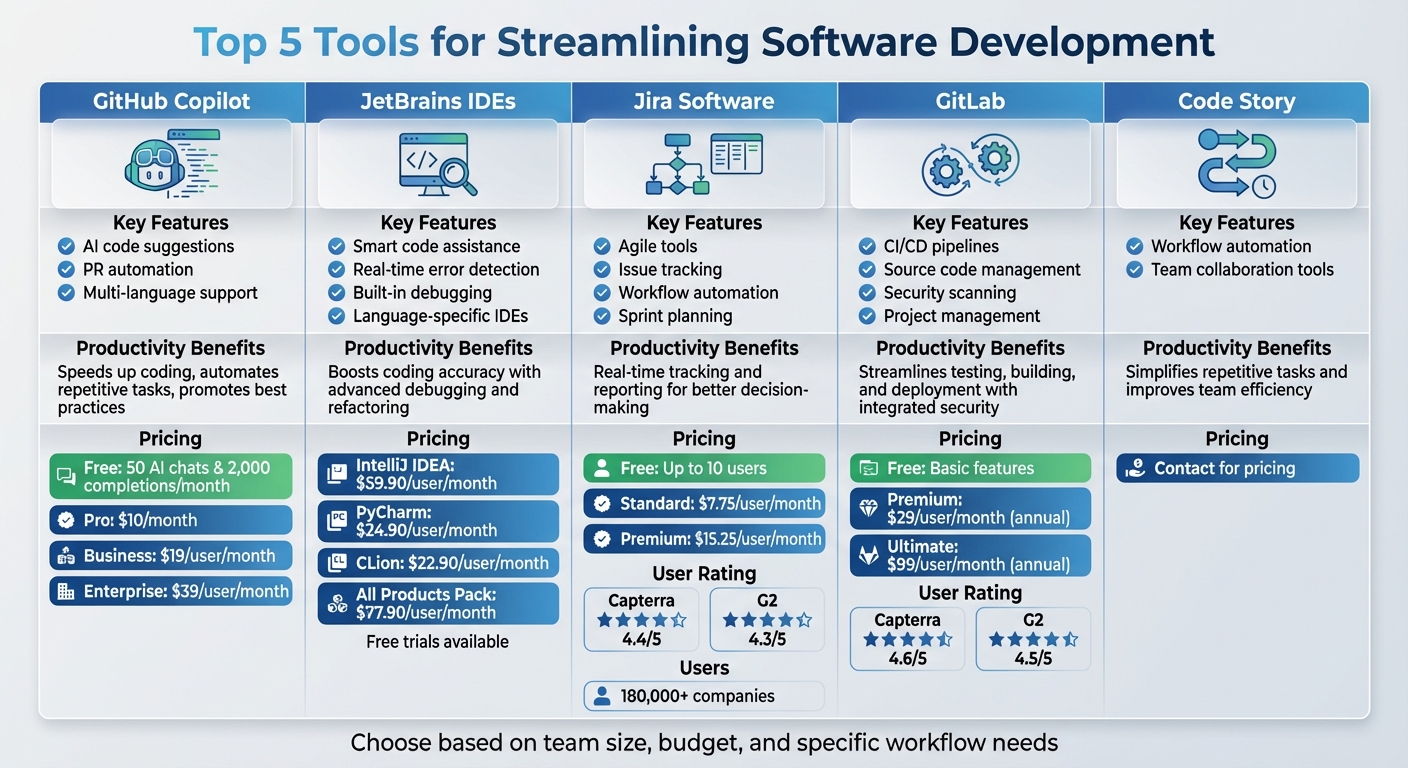
Software Development Tools Comparison: Features, Benefits, and Pricing
Best AI Tools and Helpers Apps for Software Developers in 2024
1. GitHub Copilot
GitHub Copilot is an AI-driven tool that helps you write code faster by suggesting lines or blocks of code as you type. It works seamlessly with popular editors like Visual Studio Code, GitHub Codespaces, and JetBrains IDEs, so you can easily incorporate it into your current workflow. With support for a variety of programming languages – including Python, JavaScript, TypeScript, Ruby, Go, C#, Rust, PHP, Kotlin, and SQL – it fits well with almost any tech stack, making it a versatile option for developers.
Productivity Impact
Copilot speeds up coding by predicting what you need based on the context. This reduces repetitive tasks and promotes efficient coding practices. Its interactive chat feature also provides explanations for its suggestions right within the editor, helping developers understand and refine their code.
Scalability for Teams
Whether you’re a solo developer or part of a large team, Copilot has pricing plans to suit your needs, including Free, Pro, Business, and Enterprise options. For larger teams, Copilot leverages information from your GitHub environment – such as open tabs, pull requests, issues, and discussions – to deliver project-specific suggestions. This context-aware functionality is especially helpful for onboarding new team members or tackling intricate projects.
Integration with Workflows
Copilot isn’t just about writing code – it integrates deeply into your development process. For example, its PR Agent can automatically create detailed pull request descriptions, making code reviews more efficient. While it’s widely used and highly effective, developers should still review its suggestions to ensure they’re up-to-date and align with project requirements.
2. JetBrains IDEs
JetBrains offers a range of language-specific IDEs, including IntelliJ IDEA for Java and Kotlin, PyCharm for Python, WebStorm for JavaScript, and CLion for C and C++. These tools are known for their deep language support, smart code assistance, advanced refactoring capabilities, and powerful debugging features.
Productivity Impact
JetBrains IDEs are designed to take the busywork out of coding. With features like context-aware code completion that understands your project’s structure and dependencies, they help you work smarter, not harder. Integrated refactoring tools and debugging options make it easier to spot and fix problems quickly. Plus, the consistent interface across all JetBrains products reduces the learning curve, letting you switch between tools without missing a beat. This level of efficiency aligns with the productivity boosts seen in other tools we’ve discussed.
Integration with Workflows
These IDEs integrate smoothly with version control systems like Git, simplifying code management and deployment. They also support multiple frameworks and work seamlessly with AI-powered coding assistants like GitHub Copilot and Codeium. Notably, IntelliJ IDEA includes its own AI Assistant, offering real-time, intelligent code suggestions to enhance your workflow .
Cost Effectiveness
JetBrains uses an annual subscription model for its tools. Pricing per user per month is as follows: IntelliJ IDEA Ultimate at $59.90, PyCharm at $24.90, and CLion at $22.90. For teams or developers needing access to multiple tools, the All Products Pack costs $77.90 per user per month and includes the entire suite. Free trials and limited versions are available, allowing you to explore the tools before committing. When you factor in the time saved and the productivity gains from these highly specialized tools, the investment becomes a clear value-add for developers and teams alike.
3. Jira Software

Jira Software is a widely-used project and issue-tracking tool, trusted by over 180,000 companies worldwide.
Productivity Impact
Jira boosts team efficiency by automating repetitive tasks like assigning issues, updating fields, and sending notifications. This automation helps teams focus on more critical work. Add to that real-time project progress reports, and agile teams can quickly identify and resolve bottlenecks. Features such as backlogs, sprints, and timelines simplify iterative development and sprint planning. For project managers, Advanced Roadmaps offers a way to visualize team capacity, plan timelines, manage dependencies, and allocate resources effectively.
Scalability for Teams
Jira is designed to grow with your team, whether you’re a small startup or a large enterprise. For teams with fewer than ten members, the free plan provides access to essential features without any cost. Larger teams can tap into advanced tools, though the interface might require a bit more navigation.
Integration with Workflows
Jira connects seamlessly with other Atlassian products like Confluence and Bitbucket, as well as popular tools like GitHub, Slack, Microsoft Teams, and CircleCI. Add-ons like Marker.io and Jam make it easy to attach annotated screenshots and session replays directly to Jira issues. These integrations make Jira a versatile choice for teams with diverse workflows.
Cost Effectiveness
Jira’s pricing structure accommodates teams of all sizes and budgets. Small teams can start with the free plan, while the Standard and Premium plans cost $7.75 and $15.25 per user per month, respectively. For larger organizations, Enterprise plans come with custom pricing. With its automation features and detailed reporting, many find the investment worthwhile. Jira also enjoys solid user reviews, scoring 4.4/5 on Capterra and 4.3/5 on G2.
sbb-itb-772afe6
4. GitLab

GitLab is a comprehensive DevOps platform that brings together source code management, CI/CD, and project management in one place. By combining these tools, GitLab removes the hassle of juggling multiple applications, allowing teams to manage code, testing, and deployment seamlessly under one roof.
Productivity Impact
GitLab’s integrated CI/CD pipelines handle testing, builds, and deployments directly within the platform, ensuring issues are caught early and code quality remains high. Developers can efficiently manage their workflow with features like branching, pull requests, and code reviews. Additionally, teams can track issues, set milestones, and organize tasks using Kanban boards – all without leaving the platform. This streamlined setup reduces context switching, enabling developers to concentrate on coding.
Scalability for Teams
GitLab is designed to grow with teams of all sizes. Smaller teams and startups can start with the free tier or the open-source Community Edition at no cost. As teams expand, they can opt for the Premium plan at $29 per user per month (billed annually) or the Ultimate plan at $99 per user per month. For enterprises requiring more control, GitLab also offers a self-hosted option, allowing organizations to manage their data and configurations on their own servers.
Integration with Workflows
GitLab integrates smoothly with Infrastructure as Code tools like Terraform, incorporates DAST into its CI/CD pipelines, and supports AI-driven tools like Greptile for generating code review summaries. Its built-in security scanning and vulnerability management features help teams identify and address potential risks before they reach production.
Cost Effectiveness
With ratings of 4.6/5 on Capterra and 4.5/5 on G2, GitLab is recognized for consolidating essential development tools into a single platform. The free tier offers a solid foundation for small teams, while the SaaS option reduces operational burdens by removing the need for installation and upkeep. However, for self-hosted setups, teams may face higher costs due to additional resource and configuration requirements. Next, we’ll dive into Code Story, another tool that enhances development workflows.
5. Code Story

Code Story builds on the seamless integration capabilities of GitLab, aiming to simplify and optimize software development workflows. This tool focuses on automating repetitive tasks and fostering better collaboration among development teams, making day-to-day processes more efficient. While specific details about its features, productivity boosts, integrations, and pricing aren’t widely available, its forward-thinking approach suggests it could be a valuable asset for modern development teams. For the latest and most accurate information, check out Code Story’s official channels.
Tool Comparison Table
Choose the right tool for your team by considering factors like team size, budget, and workflow requirements. Here’s a breakdown of key features, productivity perks, and pricing for popular options:
| Tool | Key Features | Productivity Benefits | Pricing |
|---|---|---|---|
| GitHub Copilot | AI-driven code suggestions, supports multiple languages (Python, JavaScript, TypeScript, Ruby, Go), real-time code completion, integrates with IDEs like VS Code, JetBrains, and Neovim | Speeds up coding by predicting code, automates repetitive tasks, and promotes best practices | Free (limited: 50 AI chats & 2,000 completions/month); Pro $10/month; Business $19/user/month; Enterprise $39/user/month |
| JetBrains IDEs | Smart code assistance, real-time error detection, built-in debugging and testing, Git integration, and tailored language support (e.g., IntelliJ IDEA, PyCharm, WebStorm) | Boosts coding accuracy and efficiency with advanced debugging and refactoring tools | Paid licenses; free trials and select free versions available |
| Jira Software | Customizable workflows, advanced issue tracking, agile project management tools (sprint planning, Kanban boards), integration with Confluence and Bitbucket, and tailored dashboards | Enables real-time tracking and reporting for better decision-making | Free for up to 10 users; Standard and Premium plans offered |
| GitLab | Built-in CI/CD pipelines, robust source code management, project management features (like issue tracking and Kanban boards), security scanning, and options for self-hosted or cloud use | Streamlines testing, building, and deployment while integrating security throughout development | Free (basic features); Premium and Ultimate plans start at $19/user/month |
| Code Story | Workflow automation and strong team collaboration tools | Simplifies repetitive tasks and improves team efficiency | Contact for pricing details |
This table highlights the strengths of each tool, helping you align their capabilities with your specific project needs.
For smaller teams or startups, tools with generous free tiers – like Jira (up to 10 users) or GitLab’s basic plan – are often the most cost-effective. Students can also access GitHub Copilot for free. Larger organizations, however, may benefit from paid plans that unlock advanced features, scalability, and dedicated support.
When selecting a tool, keep in mind factors like setup time, training, and ongoing maintenance. For example, self-hosting GitLab can cut licensing costs but requires more engineering resources. By weighing these considerations, you can choose a solution that streamlines your software development process effectively.
Conclusion
In 2025, selecting the right software development tools isn’t just a technical decision – it’s a strategic one. For organizations relying on software to achieve their goals, the tools you choose can heavily influence your project’s outcomes and your team’s productivity. A well-chosen toolkit empowers teams to produce high-quality code efficiently, streamlining workflows and enhancing overall performance.
As we’ve seen, each tool brings its own strengths to address specific development hurdles. The key is finding those that align with your unique challenges and goals.
"Software development tools will revolutionize your workflows when implemented well but they can equally slow productivity when they’re poorly chosen." – Pangea.ai
When making these decisions, it’s crucial to evaluate your team’s needs and how the tools will integrate with your existing systems. Poorly chosen tools can disrupt productivity, so take the time to ensure they truly add value. And remember, introducing new tools gradually can help your team adapt more smoothly, avoiding unnecessary overwhelm.
FAQs
How does GitHub Copilot fit into a developer’s workflow?
GitHub Copilot fits right into your development workflow, providing AI-driven code suggestions directly in your IDE. Whether it’s generating code, completing repetitive patterns, or helping with refactoring, it simplifies tasks, saves time, and enhances the quality of your code.
As you work, it learns from your style and the context of your project, making it easier to solve tricky problems and smooth out your development process. It’s a powerful companion for developers looking to boost efficiency and tackle challenges with ease.
What are the main advantages of using JetBrains IDEs for specific programming languages?
JetBrains IDEs are built to deliver language-focused features that enhance productivity and make workflows more efficient. They come equipped with smart code completion, robust refactoring tools, and advanced debugging options, all customized for languages such as Java, Python, and Kotlin.
These features empower developers to write cleaner, more efficient code while tackling complex tasks with ease. By prioritizing code quality and cutting down on development time, JetBrains IDEs have become an indispensable tool for today’s software development teams.
How does Jira Software improve collaboration and project management for development teams?
Jira Software empowers development teams to work together efficiently and keep projects on track. It offers features like customizable workflows, issue tracking, and backlog management, all designed to simplify project management. Whether you’re using Scrum, Kanban, or another agile framework, Jira helps teams plan, prioritize, and monitor progress with ease.
The tool’s integration options, including seamless connections with Confluence, enhance communication and ensure that teams stay aligned. By adapting to various workflows, Jira becomes a go-to solution for organizing software development processes and boosting productivity.